Skip to content
 EN
EN  DE
DE  العربية



Summary: flowdit and SafetyCulture appear, at first glance, to serve the same purpose: digital checklists, audits, and inspections instead of paper. The difference lies in the depth of functionality. SafetyCulture is a broad-based inspection tool with a large template library and simple operation, designed to serve as many industries as possible simultaneously. flowdit was developed for manufacturing, commissioning, maintenance, and EHS in industrial environments, offering offline operation without functional limitations, an on-premises option, and integration with SAP or Microsoft Dynamics. For smaller teams with simple, standard checklists, SafetyCulture is often sufficient. For multi-stage production facilities with strict compliance requirements and an established IT infrastructure, flowdit is, in practice, the more reliable solution.
What Are the Fundamental Differences Between flowdit and SafetyCulture (iAuditor)?
SafetyCulture was designed as a mobile checklist app for as many industries as possible, from the food service industry to construction. flowdit was developed from the outset for core industrial processes—namely, commissioning, maintenance, quality assurance, and occupational safety in production environments.
The practical difference is evident in three areas:
- Workflows: flowdit links action tracking directly to inspection results and only finalizes a report once a corrective action has been documented.
- Operating environment: flowdit continues to run fully even without network coverage, including newly created inspections.
- System Architecture: flowdit is designed to integrate with existing ERP and QM systems, while SafetyCulture primarily functions as a standalone cloud app.
This has a direct impact on an occupational safety specialist documenting a safety inspection. What matters is not the software’s user interface, but how well it integrates into existing processes and operational structures.
Less effort required for audits and inspections?
Compare the benefits of flowdit now and get started for free.
When Is SafetyCulture the Better Choice?
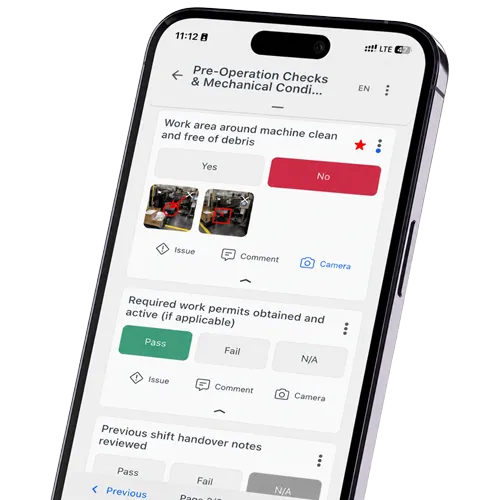
SafetyCulture is well-suited for teams that want to get started quickly without any lead time for integrations. Particularly noteworthy are the extensive template library, the intuitive mobile interface, and the visual analytics—such as heat maps for analyzing recurring sources of errors at individual locations.
This is particularly useful for:
- Smaller teams with simple inspection processes. Standardized checklists without complex branching logic can be set up in minutes.
- Multi-site operations outside the EU. Where data residency in Europe is not a concern, this point becomes less significant.
- Industries without complex ERP integrations. Those who do not need a connection to SAP or comparable systems benefit from the quick setup.
The downside is evident in user reviews on Capterra and G2, particularly regarding the customization of report layouts and templates, as well as the user-based licensing model, which can lead to higher overall costs as the number of active users increases.

When Is flowdit the Better Choice?
flowdit was developed specifically for industrial processes in which individual inspection steps, actions, and follow-up processes are linked together. This applies primarily to companies that need to map commissioning, maintenance, quality assurance, and occupational safety as an interconnected workflow.
Typical scenarios:
- Multi-stage production sites. A risk assessment that generates corrective actions—which are then tracked at the next occupational safety and health (ASA) meeting—remains consistently linked throughout flowdit.
- Companies with strict offline requirements. In cleanrooms, on construction sites, or in tunnels without network coverage, new inspections can be created entirely offline and synchronized only once a connection is established.
- Companies with an established system landscape. Where operational data is already stored in SAP, Microsoft Dynamics, or an existing QM system, a native integration prevents duplicate data maintenance.
The initial setup is generally more complex, as existing processes, roles, permissions, workflows, and interfaces must be adapted to the company’s requirements. This effort pays off when the solution is intended to support multiple locations, complex approval processes, and existing system landscapes in the long term.
SafetyCulture vs. flowdit: A Direct Comparison
| Criterion | flowdit | SafetyCulture (iAuditor) |
|---|---|---|
| Positioning | Connected Worker Platform for digital checklists, inspections, maintenance, audits & EHS: across all industries, from SMEs to large corporations | Mobile-first operations platform for inspections, checklists, reports, corrective actions, assets, and training: suitable for use across all industries |
| Modules |
|
|
| Offline Capability | Full offline operation on iOS, Android, and Windows. Inspections and audits can be performed without an internet connection; they are stored locally and automatically synchronized when a connection is established | Offline operation via the mobile app for iOS and Android. Inspections can be started, edited, and completed without an internet connection; synchronization occurs automatically or manually when a connection is established |
| Multilingual Support |
|
|
| AI & Document Migration |
|
|
| Media & data entry |
|
|
| Traceability |
|
|
| Quality & Audits |
|
|
| Security |
|
|
| Deployment Model |
|
|
| Integrations |
|
|
| Onboarding & Support |
|
|
| Pricing model |
|
|
| Company size | 20 or more employees, for medium-sized companies up to large corporations | From small teams to large international corporations; free plan for up to 10 users |
| Areas of Application | Companies in all industries, primarily industrial companies, food production, pharmaceuticals, and energy | Across all industries, including manufacturing, construction, retail, hospitality, transportation & logistics, energy, and healthcare |
Still managing operations with paper and Excel?
Digitize inspections, audits, SOPs, and corrective actions.
How Do Costs and Licensing Models Differ for Growing Teams?
SafetyCulture uses a seat-based licensing model. Depending on the role, Full Seats, Lite Seats, and Guest Seats are available. As the number of paid seats increases, licensing costs rise accordingly. For companies with multiple shifts or rotating user groups, it is therefore worth carefully planning your actual licensing needs.
For a medium-sized manufacturing company with multiple shifts and rotating staff on the production line, this means: It’s not the total number of employees that matters, but rather how many users actually need a paid seat and what user roles they fulfill.
flowdit offers various licensing models as well as customized enterprise solutions. The actual costs depend on the selected plan, the number of users, and the specific project requirements.
Before making a decision, it’s always worth performing a sample calculation covering a full shift cycle to determine the actual licensing needs and not just consider the core workforce.
How Does the Offline Feature Differ in Practice?
Both SafetyCulture and flowdit support conducting inspections without an internet connection. With both solutions, the collected data is stored locally and synchronized once the internet connection is restored.
One key difference lies in the range of supported platforms. SafetyCulture offers offline operation in its mobile app for iOS and Android. flowdit also supports offline operation on Windows devices.
For companies with work areas that lack reliable network coverage, it is recommended not only to compare the basic offline capabilities but also to check which features are actually available on the respective devices in offline mode and how these can be integrated into their daily workflows.
To What Extent Can Both Systems be Integrated into ERP and Quality Management Systems?
SafetyCulture offers standard integrations via an open API and connects to common business tools for reporting and notifications. Additional implementation effort may be required for custom or more advanced ERP integrations.
flowdit was developed with industrial system landscapes in mind and can be connected to systems such as SAP, Oracle, or Microsoft Dynamics via REST APIs. This allows master data and test results to be exchanged between systems, reducing the need for manual double entry.
How Does the Process of Switching From SafetyCulture to Another Platform Work?
In practice, the switch rarely fails because of the new software, but rather because of the migration of existing templates. Individual user reports indicate that migrating large collections of templates from SafetyCulture can require additional effort, and in some cases, templates had to be partially adjusted manually or recreated.
A realistic process for the switch consists of four steps:
- Assessment: First, document which checklists, roles, and escalation rules are actually in active use; not just what exists in theory.
- Prioritization: Next, the ten to twenty most frequently used templates are migrated first, while rarely used special cases follow later.
- Parallel operation: Both systems run in parallel for two to four weeks so that any discrepancies in results can be identified before the old solution is decommissioned.
- On-the-job training: The transition will only be effective if shift supervisors and occupational safety specialists support the new processes in day-to-day operations; not just the IT department.
How to Properly Compare SafetyCulture and flowdit
Create a specific use case before a demo.
A suitable test process might look like this:
- A recurring machine inspection is scheduled.
- The inspector receives the task on a mobile device.
- The inspection is performed in an area without internet access.
- A threshold value is exceeded.
- The inspector documents the findings with a photo and a comment.
- An urgent corrective action is assigned to a maintenance technician.
- The person in charge documents the repair.
- The quality manager verifies the implementation.
- A complete report is generated.
- The data is transferred to an existing system.
Please rate the following:
- Number of clicks required
- Ease of use for users
- Offline functionality
- Quality of reports
- Traceability of the measure
- Administrative overhead
- Integration options
- Total costs
This leads to a well-informed decision rather than a superficial comparison of features.
See if flowdit fits your workflows
FAQ | flowdit vs. SafetyCulture (iAuditor)
What is SafetyCulture?
SafetyCulture is a comprehensive platform for frontline operations that combines inspections with communication, training, and operational information.
- Digital checklists and inspections
- Capturing photos, videos, and documents
- Reporting issues and corrective actions
- Asset management
- Training and team communication
- Reports and analytics
- Monitoring selected sensor readings
What is flowdit?
flowdit is specialized software for structured inspections, audits, maintenance, quality processes, and the consistent tracking of nonconformities.
- Planning and execution of complex inspection processes
- Recording of measurement values, photos, comments, and signatures
- Automatic generation of corrective actions for nonconformities
- Management of responsibilities, priorities, and deadlines
- Seamless tracking until completion
- Cross-site standardization of processes
- Integration with SAP, Microsoft Power BI, Proalpha, and DocuWare
Is flowdit a viable alternative to SafetyCulture for the manufacturing industry?
Yes, especially when offline operation, ERP integration, and hosting in Germany are key factors. For simple, location-based checklists that don’t have these requirements, switching isn’t always necessary.
Can flowdit be run entirely on-premises?
Yes, flowdit offers not only cloud-based operation but also an on-premises option, which is relevant for companies with strict internal IT security policies or industry-specific compliance requirements.
Can SafetyCulture be integrated with SAP?
Generally speaking, yes. SafetyCulture offers an open API and integration options for connecting to existing systems. Depending on the use case, additional implementation effort may be required for custom or bidirectional integrations with SAP.
How long does it take to implement flowdit in an existing production facility?
The effort required depends on the number of existing audit templates and the depth of the ERP integration. In many cases, an implementation involving prioritized core checklists followed by parallel operation can be completed within a few weeks.