Skip to content
 EN
EN  DE
DE  العربية



Summary: Those looking for “Operations1-Alternative” are usually not just starting out on their digital transformation journey. Many companies already have digital work instructions, inspection reports, Excel spreadsheets, paper forms, PDF templates, or individual tools for quality, maintenance, and EHS. The real question, therefore, is not: Which software has more features? The better question is: Which software is a better fit for the process? Operations1 excels at digitizing employee-driven shop floor processes, particularly when it comes to digital work instructions, worker guidance, modular documents, and standardized production workflows. flowdit places a stronger emphasis on digital inspections, audits, checklists, action tracking, photo documentation, offline use, and audit-ready reports. Both solutions can be valuable in manufacturing. The difference lies in their focus.
Why Digital Documentation Alone Does Not Create Operational Control
Digital documentation and connected worker software address different problems. Documentation tools store information. Connected worker software structures the process that generates this information.
Connected worker software integrates directly into the workflow. It provides employees on-site with the right task at the right time, guides them step by step through the process, and enforces structured data collection: measurement, photo, signature, deviation, follow-up action. This is precisely where digital checklists in production demonstrate how operational processes can be aligned with record-keeping obligations, compliance requirements, and audit-ready documentation. None of this is created after the fact; nothing needs to be reconstructed. The data set is complete because the process is complete.
This is where pure documentation solutions fall short. They wait for input. Connected Worker Software systematically generates this data through guided workflows, required fields, escalation logic, and the direct linking of findings to actions. An uncompleted inspection remains visible. Platforms such as flowdit or Operations1 address this precisely by integrating inspections, work instructions, and deviations directly into the workflow. A deviation automatically triggers a task. A report is generated from the recorded data, not through manual aggregation afterward.
This is particularly relevant wherever processes must be repeatedly executed, verified, or audited: quality inspections, maintenance, commissioning, safety inspections, acceptance tests, and supplier audits. In these areas, the quality of the documentation depends directly on the quality of process management.
Are you looking for an alternative for digital inspection processes?
flowdit shows how checklists, defects, and reports come together seamlessly.
Inspections vs. Shop Floor Management: The Core Difference
The key difference between flowdit and Operations1 lies not in individual features, but in their understanding of the process.
flowdit takes a strong focus on inspections, audits, and documented controls. The software answers questions such as:
- Was the inspection performed?
- Are all items fully documented?
- What defects were found?
- Who is responsible for the corrective action?
- Is the report audit-ready?
- Can the process be executed consistently across multiple locations?
Operations1 takes a stronger focus on guided execution on the shop floor. The platform answers questions such as:
- Which work instruction is relevant for this order?
- Which variant needs to be considered?
- Which content is currently valid?
- How is the employee guided safely through the work step?
- How can documents be versioned centrally?
- How are shop floor processes standardized?
Both are valuable. But they start from different points of view.
flowdit and Operations1: Two Different Approaches to Connected Work
 flowdit
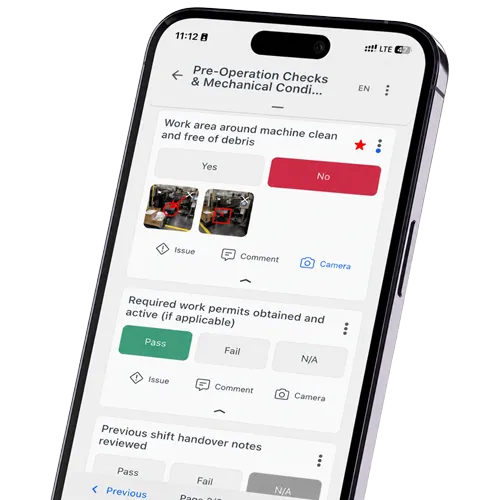
flowdit is a connected worker software solution for digital inspections, audits, checklists, inspections, and operational documentation processes. Teams can create checklists, conduct inspections on the go, capture photos and evidence, document defects, assign corrective actions, and generate reports automatically.
The practical focus is on work that doesn't take place at a desk—in manufacturing, on construction sites, in technical facilities, in maintenance, in quality management, in EHS processes, or during cross-site audits. Offline capability is particularly important here. Inspections can be carried out even when the connection is poor or nonexistent.
flowdit combines several process steps into a single workflow:
- Schedule inspection
- Execute checklist
- Document nonconformity
- Attach photo or evidence
- Assign corrective action
- Track status
- Create report
- Document for audit purposes
 Operations1
Operations1 is a connected worker software solution for the digitalization of employee-led production processes. The platform is particularly well-known for its digital work instructions, checklists, modular documents, variant management, task management, qualification management, multilingual support, interfaces, and AI features.
The focus is strongly on the shop floor. Employees should be able to perform workflows in a standardized, visually guided, and context-sensitive manner. This is particularly relevant when products, machines, variants, or assembly processes are complex and employees need clear step-by-step instructions.
Operations1 is therefore particularly well-suited for companies that want to centrally manage work instructions, inspection reports, and production-related standards and integrate them into guided processes.
flowdit vs. Operations1: A Practical Comparison
| Criterion | flowdit | Operations1 |
|---|---|---|
| Positioning | Connected Worker Platform for digital checklists, inspections, maintenance, audits & EHS - across all industries, from SMEs to large corporations | Connected Worker Platform for employee-led manufacturing processes - focus on shop floor documentation in the manufacturing industry |
| Modules |
|
|
| Offline Capability | Full offline operation on iOS, Android, and Windows. Inspections and audits can be performed without an internet connection; data is stored locally and automatically synchronized when a connection is established | Full offline operation on iOS & Android—tasks can be performed without an internet connection; reports are synchronized when a connection is established |
| Multilingual Support |
|
|
| AI & Document Migration |
|
|
| Media & Data Entry |
|
|
| Traceability |
|
|
| Quality & Audits |
|
|
| Security |
|
|
| Deployment Model |
|
|
| Integrations |
|
|
| Onboarding & Support |
|
|
| Pricing Model |
|
|
| Company Size | From 20 employees up to large corporations | Entry level starting at 500 employees (according to the provider) |
| Application Area | Companies across all industries, primarily industrial companies, food production, pharmaceuticals, and energy | Manufacturing and industrial companies (automotive, mechanical engineering, consumer goods) with international rollout requirements for 100 or more users |
Key Questions Before Choosing a Connected Worker Platform
Before deciding between flowdit and Operations1, you should first be clear about which process actually needs to be improved. While connected worker software and digital checklist software overlap in many areas, they do not automatically solve the same problems.
- Which processes should be digitized first?
- Is the focus primarily on work instructions and worker guidance, or on inspections, maintenance, audits, and commissioning?
- Do actions resulting from deviations need to be tracked directly?
- How important is offline capability?
- Do reports need to be generated automatically and in an audit-ready format?
- How many locations, teams, or plants are expected to be integrated in the long term?
- What security, role, and permission concepts are required?
- Who creates the templates, and who works with the checklists on a daily basis?
- How easy must it be to customize, version, and roll out templates across locations?
- Which existing systems need to be integrated, such as ERP, CMMS, DMS, or BI?
- How much training is required for departments, inspectors, and external stakeholders?
Still managing operations with paper and Excel?
Digitize inspections, audits, SOPs, and corrective actions.
Which Solution Fits your Inspection and Quality Workflows?
flowdit is the right choice when inspections, audits, checklists, defect management, and audit-ready reports need to be mapped as an integrated process: from the inspection at the job site to the documented corrective action. The software is designed to support teams directly in the field, document evidence in an audit-proof manner, and standardize quality and safety processes across all locations. This makes flowdit particularly relevant for quality management, EHS, maintenance, and acceptance processes in industrial environments.
Operations1 takes a different approach: worker guidance, digital work instructions, and the standardization of complex shop floor processes. Those in production who want to centrally manage process knowledge and guide employees through varied manufacturing steps will find a clearly tailored approach there.
Both solutions address real-world problems, but in different process areas. Those who want to map inspection and audit processes, seamless action tracking, and structured reporting on a single platform are well-served by flowdit.
A good demo is not about screenshots, but about a real inspection workflow
If, in addition to Operations1, no-code platforms such as smapOne are also on your shortlist, our comparison flowdit vs. smapOne will help you decide between a flexible app builder and a specialized testing platform.
FAQ | flowdit vs. Operations1
What is the main difference between flowdit and Operations1?
Both flowdit and Operations1 can support digital work instructions and guided operational workflows. The main difference lies in the process focus. Operations1 is often positioned around operator guidance, variant logic, and production-oriented work instructions, while flowdit is especially strong when inspections, audits, quality checks, defect tracking, corrective actions, offline use, and audit-ready reporting need to be connected in one workflow.
Is flowdit an alternative to Operations1?
Yes. flowdit is a direct alternative to Operations1 for companies that want to manage inspections, audits, quality processes, EHS tasks, maintenance workflows, and digital work instructions in one connected system. While Operations1 is often associated with production-focused work instructions, flowdit is particularly strong when guided execution needs to be combined with documentation, issue tracking, corrective actions, offline use, and audit-ready reporting.
How do digital work instructions differ from digital inspection checklists?
Digital work instructions guide employees step by step through a task, such as assembly, setup, cleaning, or maintenance. Digital inspection checklists, on the other hand, document whether a condition, process, or result meets the defined requirements.
Which software is better suited for digital checklists?
That depends on what the checklist is intended to do. For inspection-oriented applications such as quality controls, safety inspections, audits, acceptance tests, and maintenance checks, flowdit is the perfect fit. For checklists that are part of guided work processes involving “if-then” logic and variant control, Operations1 is more suitable.
Which software is better for manufacturing?
That depends less on the software label and more on the operational process you want to control. flowdit is especially strong when inspections, audits, quality control, EHS tasks, maintenance workflows, corrective actions, documentation, and reporting need to work together. It also supports digital work instructions and guided workflows, while Operations1 is often positioned around production-focused work instructions, assembly processes, variant logic, and operator guidance.
How do digital checklists help with quality inspections and audits?
Digital checklists ensure a standardized audit structure. Required fields, media evidence, timestamps, and auditor identification are built in and are not optional. Deviations are recorded immediately and can be linked directly to corrective actions. The result is audit-ready documentation that does not have to be compiled afterward but is generated during the audit process itself.
How can inspection reports be generated automatically from digital checklists?
Automated reporting requires that all relevant data be recorded in a structured manner during the inspection itself: responses, photos, comments, timestamps, inspectors, location, attachments, signatures, and open actions. If these fields are consistently defined, the report is the direct result of the completed inspection process; it does not require a separate documentation step.
Why is Excel often no longer sufficient for quality checks and audits in production?
Excel is flexible, but it lacks process reliability when multiple plants, shifts, inspectors, and approvals are involved. It lacks controlled versions, role-based permissions, required fields, photo documentation, automatic escalations, and a complete audit trail.
Which Operations1 alternative is best suited for quality, EHS, and maintenance?
For Quality, EHS, and Maintenance, flowdit is an obvious alternative, as these areas rely heavily on inspections, documentation, corrective actions, and recurring checklists. Typical examples include safety inspections, quality audits, maintenance checks, acceptance inspections, and defect tracking.
Which solution is better suited for international locations?
Both systems can support international processes. Operations1 excels at centrally maintained work instructions and multilingual shop floor content. flowdit excels at standardized inspection criteria, offline use, audit processes, reports, and corrective actions across multiple locations.
Which software integrates better with existing systems such as SAP, Power BI, or DMS?
When it comes to integrations, the brand name matters less than the data logic: audit objects, assets, users, actions, status values, and reports must be able to be transferred accurately. Flowdit is particularly well-suited when audit and inspection data needs to be integrated into systems such as SAP, Power BI, DMS, or BI dashboards. In practice, it is important that the software delivers structured data rather than simply storing PDF documents. This is precisely where the added value lies, as inspections are transformed into key metrics, action lists, and management reports.