 Skip to content
 EN
EN  DE
DE  العربية



-
Manufacturing Work Instruction Software for Quality and Operations Teams
Digital Work Instructions That Actually Work
No card required
Up and running in 5 mins







Chosen by the Teams That Keep Operations Running








Step-by-Step Instructions
What Are Digital Work Instructions and Why They Matter
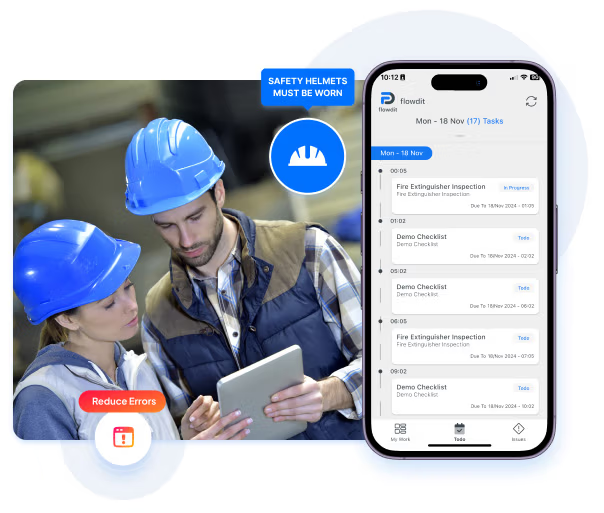
Outdated paper instructions cause delays and costly mistakes. Digital work instructions enable you to cut onboarding time by up to 50%, reduce errors and rework, keep instructions instantly updated and accessible on any device, and streamline communication between the shop floor and management.
Why Choose flowdit
flowdit - Built for Manufacturers, Loved by Quality Teams
flowdit is more than software – it’s tailored to meet the real needs of manufacturing and quality teams. User-friendly, flexible, and powerful, flowdit helps you work smarter without complexity. Get started quickly, capture and resolve issues in real time, and generate audit-ready reports effortlessly.
Tailored to Your Needs
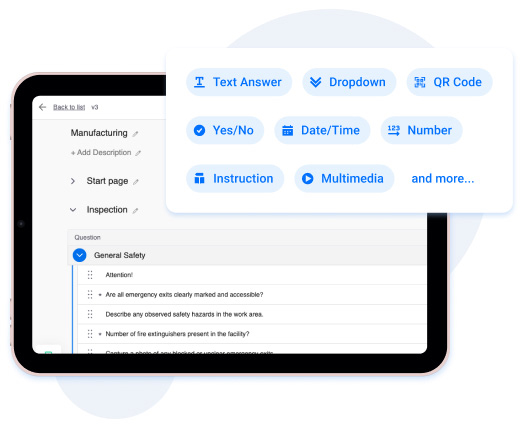
Build Workflows with Custom Templates

Instructions On-the-Go
Access Work Instructions Anywhere
Give your teams mobile access to instructions anytime, anywhere -whether in the field or on-site – to complete tasks accurately. Collect real-time feedback directly from your workforce to identify improvement areas and continuously optimize workflows.
Continuous Improvement
Collect Feedback for Process Improvement
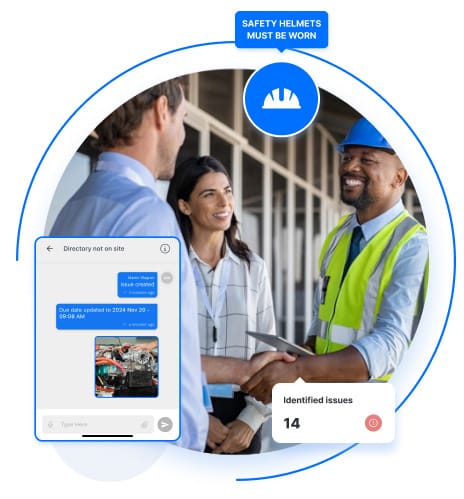
flowdit digitizes your work instructions & SOPs with interactive content – videos, images, 3D files, and more – ensuring they are always current and accessible. Operators can quickly create tickets to report issues, capture shop floor data in real time, and perform inline quality controls to keep processes running smoothly.
Transform Your Workflow with
Our Digital Work Instruction Software
Cross-platform compatibility
Secure cloud storage
IoT sensor integration
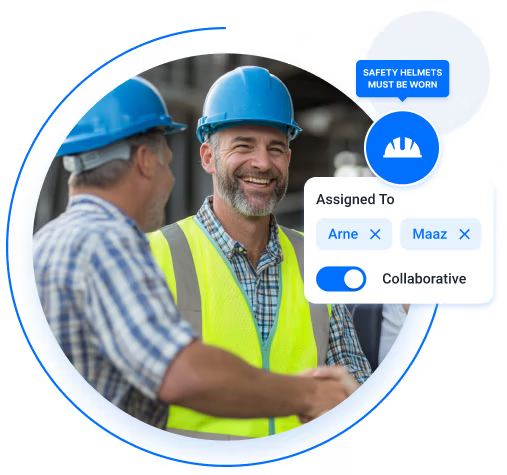
Real-time collaboration
Offline functionality
Automated workflows
No-code form builder
Data analytics and reporting
GPS tracking
Multi-language support
Mobile-first design
Role-based access control
Perfect fit for every team
Get started fast with out-of-the-box solutions.
Easily customize flowdit as team needs grow!
CONSTRUCTION
flowdit enhances efficiency, reduces delays, boosts productivity, ensures safety.
Project Manager
Granted Works Contractors
LOGISTICS
flowdit unifies operations, boosts efficiency, and enhances team collaboration.
Operations Manager
Loadtrack Logistics
ENERGY
flowdit streamlines processes, boosts efficiency, and empowers innovation.
Sun Horizon Energy Solutions
AVIATION
flowdit transforms operations, ensuring clarity, adaptability, and team alignment.
Chief Operations Officer
SkyTrack Aviation Services

MANUFACTURING
flowdit enhances efficiency, ensures compliance, simplifies processes, and saves time.
Quality Assurance Manager
IronEdge Fabrications
Empower Teams with Integrated Work Instructions
flowdit ensures your data is protected with enterprise-grade security and GDPR, ISO 9001 compliance, giving you peace of mind. Our scalable platform grows with your business, supports multi-language environments, and meets strict industry regulations – making flowdit the trusted choice for teams focused on quality and operational excellence.

How Industries Leverage flowdit as Digital Work Instruction Software
Clear instructions. Consistent processes.
Author, approve and distribute digital work instructions in one platform - flowdit supports consistent execution of approved procedures across operators, shifts and production lines
No card required
Up and running in 5 mins


Got questions?
FAQ | Work Instruction Software
What is work instruction software?
Work instruction software is a digital tool that enables businesses to create, manage, and deliver step-by-step instructions to employees. This is especially true for manufacturing operations, which require exact process documentation, visual aids, and electronic instructions.
The software supports digital transformation and process streamlining by centralizing information, ensuring that tasks are carried out accurately and consistently. The integration of work orders enables smooth task management, improving clarity and coordination. Standard work practices benefit from structured guidance, which promotes uniformity among teams.
How is work instruction software different from traditional SOP documents?
Traditional SOP documents outline procedures at a general process level and are usually stored as static files, such as manuals or PDFs.
Work instruction software converts those procedures into sequential actions that operators carry out directly while performing the task. During the execution of the work, the system may necessitate confirmations, measurements, or photographs.
This transforms instructions from passive documentation into a process that is actively guided and recorded.
How do i create digital work instructions?
- Define the task and break it down into clear process steps. Start by documenting the exact sequence of actions required to perform the operation correctly and consistently.
- Structure the instruction in a digital editor. Organize the workflow into step-by-step guidance instead of long documents so each activity can be followed easily during execution.
- Add visual support to each step. Use images, diagrams, or short videos to explain actions that are difficult to describe with text alone.
- Publish the instruction and control versions. Release approved instructions digitally so workers always access the latest validated version.
- Update the instruction when processes change. Adjust steps, visuals, or parameters whenever improvements or process updates occur to keep instructions accurate.
How are checklists used in work instruction software?
Work instruction software uses checklists to guide operators through each required step and ensure no action is skipped. Decision trees and conditional logic adjust the next instruction based on the operator’s input, measurements, or inspection results. This enables the procedure to adapt to different scenarios without requiring separate documents. The outcome is a structured workflow in which the operator is guided by the system along the correct path for the specific situation.
How can work instructions be linked to machines, assets, or locations?
Within the system, work instructions can be directly assigned to specific machines, assets, or workstations. The correct instruction for that equipment or location automatically appears when an operator selects or scans the asset. This guarantees that the procedure corresponds precisely to the machine configuration or task at hand.
Can work instruction software be used offline in production or remote environments?
Yes. Most work instruction systems enable instructions to be stored locally on the device so operators can follow procedures without an active internet connection. Workers can complete steps, record measurements, and capture photos while offline. Once the device reconnects, the collected data synchronizes automatically with the central system. This ensures uninterrupted execution even in production areas or remote sites with unstable connectivity.
How do companies ensure workers actually follow digital work instructions?
Companies ensure compliance by requiring operators to confirm each step during execution rather than relying on passive documents. The system records actions such as step confirmations, measurements, or photos, creating traceable evidence that the procedure was followed. Supervisors can review this execution data and identify skipped steps or deviations immediately.
What are the features of digital instruction software?
Digitized Workflows: Move effortlessly from paper-based procedures to entirely digital operations, facilitating streamlined task completion and minimizing operational delays.
Standardized Templates: Apply ready-made instruction frameworks to uphold consistency and transparency across all tasks, while reducing mistakes arising from inconsistent documentation practices.
Scalability for Growth: Adapt easily to future needs with scalable solutions that accommodate new processes, updates revisions, and growing teams.
Version and Process Control: Track changes effectively with version control, ensuring only the latest and most accurate instructions are accessible.
Document Permissions and Sharing : Control who can view or edit documents to maintain data security and streamline collaborative efforts.
Multimedia Integration: Enhance instructions with images, videos, and interactive elements to improve understanding and engagement.
Reporting and Analytics: Gain actionable insights into task performance and compliance through real-time reporting and analytics tools.
API and Integrations: Seamlessly integrate with existing systems to connect work instruction software with other enterprise tools for a cohesive digital ecosystem.
Efficient Communication: Share updates, notify teams of changes, and ensure critical information reaches employees promptly and effectively.
Mobile Accessibility: Support microlearning and on-the-go training with mobile platforms, enabling employees to access instructions anytime, anywhere.
What are the benefits of using digital work instruction software?
Centralized Document Management: All instructions are stored digitally in one central repository, eliminating the need for physical storage. Employees can access the documents anytime, whether stored on local servers or the cloud.
Efficient Knowledge Sharing: All employees can be informed of updates or changes immediately, without interrupting the daily operations. Access to information is available anytime and anywhere, ensuring smooth workflows.
Engaging and Effective Training: Incorporate visual aids like photos, videos, and interactive quizzes into instructions to make learning intuitive and engaging, accelerating employee understanding and retention.
Streamlined Feedback Mechanisms: Employees can immediately report process flaws or suggest improvements through the software, which helps managers tackle issues without delay.
Process Consistency and Compliance: Standardized instructions reduce process deviations. Built-in permission requirements ensure that only authorized personnel make updates, maintaining quality and consistency across tasks.
Centralized Knowledge Access: Having a single, consolidated platform for work instructions ensures that staff members always have a reliable source of information at their disposal. This reduces time lost to searching for details and empowers teams to make faster, better-informed decisions.
Increased Precision: By meticulously describing each step within a given process, work instructions lower the likelihood of errors and elevate accuracy levels. This proves especially vital in industries such as manufacturing or healthcare, where attention to detail has an immediate impact on both product quality and regulatory conformity.
Enhanced Productivity: Having well-defined directives at hand enables employees to minimize time spent on problem-solving and maximize time devoted to task execution. The resulting clarity drives more efficient operations and delivers concrete, measurable productivity improvements.
Consistency Across Tasks: Standardized processes ensure that every task is performed uniformly, minimizing variability and strengthening operational trustworthiness.
Improved Collaboration: Work instructions break down barriers and provide a shared structure, thereby strengthening teamwork and giving employees a clearer sense of their roles within the overall process.
Cost Efficiency: Optimized workflows and minimized mistakes result in significant financial benefits. Appropriate software removes bottlenecks created by legacy systems, releasing capacity for more productive endeavors.
Adaptability to Change: The best digital work instruction software enables real-time updates of instructions, ensuring teams are always equipped with the latest processes and standards. This adaptability is critical in fast-changing industries where requirements evolve frequently.
How can work digital work instruction software improve productivity?
Digital work instruction software increases productivity by giving employees clear, structured guidance exactly when and where they need it.
Instead of relying on printed manuals or outdated documents, teams follow current, task-specific instructions directly on their devices.
Embedded visuals and interactive elements shorten the time it takes to get new employees up to speed, while reducing mistakes during routine and complex operations alike.
Because instructions are created, updated, and distributed from a central system, every team member works from the same verified procedures - regardless of location or shift.
The result is fewer errors, stronger process compliance, and a measurable improvement in operational consistency across your organization.
How can a work instruction software solution reduce errors?
Work instruction solutions reduce errors by giving employees precise, consistent, and centrally managed instructions for every task. Visual aids, real-time updates, and step-by-step digital guidance ensure that processes are followed as intended, leaving less room for deviations or misinterpretations. The expertise of experienced employees can be documented systematically and made available across the entire team, ensuring that critical knowledge is not lost and standards are maintained consistently.
Instructions are accessible at any time, eliminating the need to search through filing cabinets, binders, or outdated printed manuals. Beyond individual tasks, work instruction software functions as a structured knowledge repository, enabling companies to document every process and establish uniform operational standards across locations and teams. Replacing paper-based methods with digital, guided instructions brings greater clarity to daily workflows and ensures that employees always have the correct, current information at hand. This structured approach reduces the likelihood of errors and contributes directly to higher operational reliability.
What should I consider when choosing the right software?
Choose work instruction software that streamlines processes and supports your organization’s objectives.
Search for tools that offer step-by-step guidance and work well with your current systems. To be considered high-quality, software must include features such as real-time updates, scalability, and the ability to adapt to specific industry needs.
An easy-to-use editor is essential; it enables employees to create and adjust instructions without needing extensive training. The software should support multimedia elements like videos and images to create clear and engaging documentation.
An intuitive design for usability guarantees quicker adoption, and strong version control enables you to maintain a history of changes and revert to previous versions when needed. It is crucial to track changes and inform users of updates in order to uphold collaboration and consistency, particularly with many contributors.
Furthermore, advanced reporting and analytics functionalities offer insights into user engagement, aiding you in process refinement and performance assessment.
Finally, prioritize cloud-based solutions that enable secure storage and simple sharing of instructions. This guarantees that remote teams can access it and makes real-time collaboration easier.
What is the best work instruction software?
The best work instruction software is one that fits your operational processes and helps teams execute tasks consistently. It provides customized solutions, flexible templates, and workflows that match your processes exactly.
By clearly defining tasks and making them easy to follow, interactive work instructions help reduce errors and ensure consistent quality. In manufacturing, the appropriate work instruction system ensures precision, scalability, and adherence to industry standards. An ideal tool fosters collaboration, improves clarity through interactive content, and is scalable. Powerful analytics help optimize workflows, and seamless integration ensures smooth data exchange across departments.
In intricate sectors such as manufacturing, the finest software goes beyond minimizing errors; it fosters continuous learning with features like intuitive designs and mobile access. To get the most out of your investment, prioritize efficiency, compliance, and measurable outcomes.