Skip to content
 EN
EN  DE
DE  العربية




Summary: A Lumiform alternative is particularly worthwhile when digital checklists alone are no longer sufficient to consistently manage inspections, nonconformities, and corrective actions. flowdit combines checklists, nonconformity tracking, corrective action management, and audit-ready reporting into a single process.
At first glance, Lumiform and flowdit pursue a similar goal: digitally mapping checklists, inspections, and audits. In practice, however, the solutions differ significantly in their focus. Lumiform is primarily suited for mobile checklists, on-site inspections, and audits that need to be created, distributed, and used operationally quickly. flowdit is geared more toward industrial inspection environments where rule-based checklists, digital worker guidance, offline use, corrective action management, photo documentation, work instructions, and audit-ready reports all work together. For quality managers and production managers, it is therefore crucial to determine whether the goal is simply to replace paper forms with digital ones or whether inspections, nonconformities, corrective actions, evidence, and work instructions need to be managed end-to-end.
Why Inspection Software Must Go Beyond Simple Checklists
A checklist is only as good as the process behind it. Weaknesses rarely become apparent while filling it out. They emerge afterward: Who is responsible for taking action? By when? How is the status tracked? Is the follow-up documented?
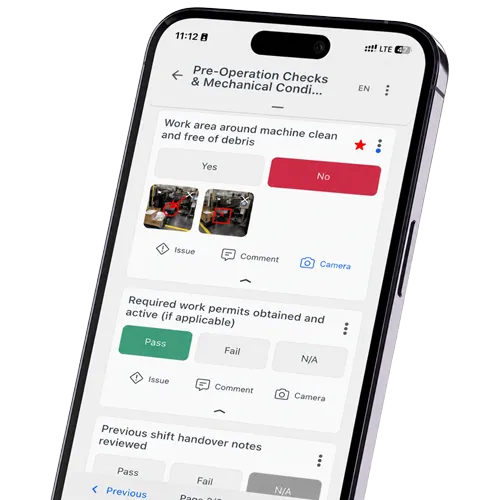
An example: During a machine acceptance inspection, an incorrectly installed protective cover is noted, a photo is attached, and the item is marked as “failed.” In a simple form-based system, the process ends here. In an end-to-end inspection process, this automatically becomes a traceable task with assigned responsibility, a deadline, status tracking, and verification in the final report. This creates true controllability, going far beyond mere documentation.
This difference is particularly important when inspections take place regularly or involve safety-critical, quality-relevant, or audit-subject processes.
Is your current checklist solution sufficient for complex inspection processes?
flowdit combines digital checklists, defects, corrective actions, and reports into a clear process
Form Digitization or an End-to-End Inspection Process?
When selecting software, attention quickly turns to individual features: Can photos be attached? Are there automatic reports? Does the app work offline? These criteria are relevant, but they don’t address what ultimately matters. The crucial questions go further:
- What happens to a recorded deviation?
- Who receives the corrective action, and how is the status tracked?
- How is an audit-ready report generated?
- How can multiple locations be compared?
- How does the process handle an unstable network connection?
Studies on the digitization of industrial quality processes show that the greatest efficiency gains are only realized when recorded deviations and corrective actions are processed in a structured manner. In other words, precisely in the part that often remains manual when using pure form tools.
Lumiform is designed to quickly digitize inspections and forms and make results centrally visible. This works reliably for standardized inspection procedures with manageable complexity.
flowdit takes a different approach: checklists, corrective actions, media documentation, roles, reports, and status tracking are linked together as part of a single process. Not as separate modules, but rather as a seamless workflow. This becomes relevant as soon as documentation requirements, offline needs, or cross-location traceability come to the forefront.
flowdit and Lumiform: A Short Overview
 flowdit
flowdit is software for digital inspections, audits, checklists, work instructions, quality processes, and corrective action management. The platform helps teams carry out inspection processes in a structured manner, capture evidence directly on-site, and document results in an audit-ready format.
The focus is on the entire process rather than individual checklists: Plan inspections, assign tasks, carry them out step by step, capture images or measurement values, document deviations, derive corrective actions, assign responsible parties, and generate reports.
This makes flowdit particularly suitable for processes where inspections are technical, safety-related, or subject to documentation requirements. These include, for example, machine acceptance inspections, maintenance inspections, quality controls, EHS inspections, production checks, commissioning processes, 5S audits, Gemba Walks, or digital work instructions.
 Lumiform
Lumiform is software for digital checklists, inspections, and audits. Teams can create forms, conduct inspections on mobile devices, add photos, derive tasks from nonconformities, and evaluate results in dashboards.
The major advantage is its quick usability. Anyone who has previously worked with paper forms, PDF checklists, or Excel templates can digitize processes relatively easily with Lumiform. This makes the solution ideal for recurring inspections, site visits, safety checks, cleaning logs, quality checks, or routine operational inspections.
Lumiform is particularly well-suited when many employees regularly perform simple to moderately complex checks and the results need to be made visible centrally.
flowdit vs. Lumiform: A Practical Comparison
| Criterion | flowdit | Lumiform |
|---|---|---|
| Positioning | Connected Worker Platform for digital checklists, inspections, maintenance, audits & EHS - across all industries, from SMEs to large corporations | Lumiform is designed for digital checklists, forms, inspections, and audits. The focus is on mobile inspection workflows, templates, and reports. |
| Features |
|
|
| Offline Capability | Full offline operation on iOS, Android, and Windows. Inspections and audits can be conducted without an internet connection; data is stored locally and automatically synced when a connection is established |
|
| Multilingual support |
|
|
| AI & Document Migration |
|
|
| Media & Data Entry |
|
|
| Traceability |
|
|
| Quality & Audits |
|
|
| Security |
|
|
| Deployment Model |
|
|
| Integrations |
|
|
| Onboarding & Support |
|
|
| Company size | From 20 employees up to large corporations | Information available upon request |
| Pricing Model |
| Professional starting at 100 euros per month. The price for Enterprise depends on the number of users, add-ons, integrations, and features |
Still managing operations with paper and Excel?
Digitize inspections, audits, SOPs, and corrective actions.
Common Risks When Selecting Inspection Software
A common mistake is to evaluate inspection software based solely on its user interface. A modern app is important, but it says little about how well the solution handles complex workflows. What matters most is what happens when many checklists, many users, many locations, and many deviations come together.
Another risk lies in overly general requirements. If you simply state that checklists need to be digitized, almost any solution will be presented as a suitable fit. It’s better to examine specific everyday scenarios.
Future scalability should not be underestimated either. Many companies start with a simple audit or inspection. After a short time, additional requirements arise. Then the focus shifts to work instructions, approvals, suppliers, corrective actions, analytics, role models, or cross-site standards. If the software isn’t designed for this, a new siloed system quickly emerges.
The right software is not measured by feature count, but by its fit with the process it needs to support.
Choosing Between Lumiform and flowdit
The decision becomes clearer when you look beyond the checklist itself and evaluate what happens before, during, and after each inspection.- Process Depth Following a Deviation: Does the documentation end with the form, or is a traceable process automatically created that includes responsibilities and deadlines?
- Offline Capability Under Load: Does synchronization work reliably even when many inspection points are recorded offline simultaneously?
- Scaling Across Locations: Can results from multiple locations be accurately compared and evaluated?
- Audit readiness of reports: Is the report sufficient for internal and external audits without further processing?
- Implementation effort: How quickly can templates, roles, and approvals be adapted to your own process?
When is Lumiform a good fit, and when is flowdit the better choice?
Lumiform is a good fit when teams want to quickly use digital forms, inspections, and mobile checklists for a variety of applications. flowdit becomes a more attractive option when inspection processes are more deeply integrated with quality, operational safety, maintenance, audits, and corrective actions. In practice, the checklist is only the starting point; the decisive value lies in the process that follows.
Would you like to see how a specific inspection process works in flowdit?
FAQ | flowdit vs. Lumiform
Which software is better suited for industrial checklists: Lumiform or flowdit?
The right choice depends on the complexity of your processes:
Scope of use: Lumiform is designed as a flexible form and checklist tool, well suited for straightforward, fast documentation needs. flowdit is designed for complex industrial processes; combining quality management, maintenance, EHS, and audits within a single connected system.
Process depth: flowdit follows a closed inspection loop: checklist → deviation → corrective action → documentation, all within one workflow. Lumiform’s process is typically centered around the completed checklist itself, with deviation and corrective-action handling depending on individual setup and add-ons.
Is flowdit a good alternative to Lumiform?
Yes, especially when digital checklists alone aren’t enough. flowdit is ideal when inspections need to be linked to corrective actions, work instructions, photo documentation, roles, assets, and audit-ready reports.
For which companies is flowdit a better fit than Lumiform?
flowdit is particularly well-suited when inspections need to be documented and, at the same time, integrated into a clear industrial process. This includes machine inspections, shop floor audits, maintenance rounds, quality controls, and cross-site standards.
How do flowdit and Lumiform differ when it comes to creating digital checklists?
Both solutions support digital checklists with mobile data entry, media, and structured inspections. The difference lies in how they are integrated: flowdit treats checklists as part of an inspection, audit, or quality process. This transforms individual forms into documentation that includes actions, responsibilities, and reports.
Can you use flowdit or Lumiform to capture photos, comments, and signatures right on site?
Yes, these features are standard. However, for industrial inspections, photos, comments, and signatures are only truly valuable if they are automatically assigned to the correct inspection point, object, and report. It is precisely this assignment that makes all the difference later on during audits, complaints, or internal documentation.
Do flowdit and Lumiform work offline as well?
Yes, both solutions offer offline capabilities for mobile inspections. The key factor here is not only the ability to collect data without an internet connection, but also seamless synchronization afterward, so that all data remains complete, accurate, and correctly assigned to the appropriate inspection object.
Which software is better suited for audits?
Both solutions are suitable for audits. Lumiform excels at mobile audits and fast form-processing workflows. flowdit is particularly useful when audits involve corrective actions, supporting documentation, responsibilities, and recurring review processes.
Can flowdit be integrated into existing systems?
Yes, flowdit can be integrated with existing system environments, for example, to transfer master data, measures, or reports. The specific integration requirements are assessed on a case-by-case basis in advance.
How can digital checklists be successfully implemented in production without overwhelming employees?
The most common mistake is to digitize all inspection processes in the plant right away. It’s better to start with a recurring checklist (such as shift handoffs, machine inspections, or FAT testing) and test it during a clearly defined pilot period. Training works best right on the shop floor using the equipment that will be used later.
How much work does it take to switch from Lumiform to flowdit?
Existing checklists and templates can be transferred in a structured manner. The real effort lies less in the technical transition than in determining how measures, roles, and approvals should be mapped out in the new process – this is defined jointly during the implementation.