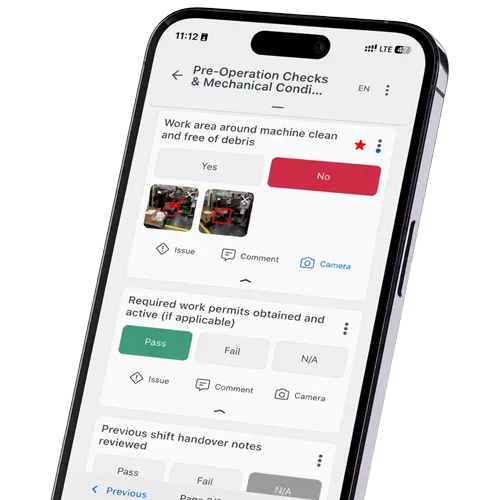
Summary: Mobile operator rounds put the round sheet on a tablet or smartphone. The operator follows the route in a checklist app, enters each reading at the asset and sees right away if a value is out of range. Below you find a worked pump example, a rollout plan in six steps and the most common mistakes when plants leave paper behind. Comparing vendors? See our overview of operator rounds software.
What Changes When Rounds Move from Paper to a Mobile App
Operators walk the same route and check the same points. The table shows where the app changes the work.
What Your Operator Rounds Checklist App Must Handle: Offline, Limits, Audit Trail
Offline mode. Many routes cross basements, tank farms or offshore decks without signal, so the app has to store readings, photos and signatures and sync later.
Measurement fields with limits. The operator should see a wrong value while still at the pump, not after the shift when someone checks the sheet.
Asset check-in by QR code or NFC tag; on large outdoor sites, GPS helps too.
An audit trail that shows who entered what and when.
Findings need a follow-up: photo, note and a task with an owner.
For enterprise use across sites, one template library, user roles and an interface to the CMMS or ERP.
Devices your team already carries. In hazardous areas that means ATEX-certified smartphones or tablets.
How to Digitize Operator Rounds in 6 Steps
Pick one route. Start with a route that has clear readings and a known weak spot, not with the most complex unit.
Clean up the round sheet. Remove checks nobody acts on. Where a limit makes sense, write it down; visual checks become fixed answers such as OK or not OK.
Build the digital checklist in the order the operator walks. Use number fields with limits, fixed answers and a photo where a finding needs proof.
Tag the assets with a QR code or NFC tag at each check point, at a height operators can reach.
Test with the people who walk the route. Go along in the first week, much like a Gemba walk, ask what is slow or unclear and fix it before the next shift.
Agree who acts on which finding and by when. Then add the next route.
Example: Turning a Pump Inspection Sheet into a Mobile Round
The paper sheet for a pump lists pump ID, discharge pressure, bearing temperature, a leak check and the operator’s signature. In the app it looks like this:
Paper field
In the app
Pump ID
QR code or NFC tag on the pump, scanned on arrival
Discharge pressure
Number field with lower and upper limit
Bearing temperature
Number field with limit; a value out of range asks for a photo
Leak check
Yes or no; “yes” opens a note, a photo and a task
Signature
Name and time stamp per entry, plus a signature at the end
Test it in flight mode first.
Downtime from missed maintenance?
Plan maintenance, track actions, detect failures earlier.
Each round stores who checked which asset, which values went in and when each entry was made, and if someone corrects a value later, the change is logged with name and time. Auditors see the full history. Nobody searches binders.
What to Track After the Rollout
Three numbers show whether the rounds work: rounds completed on time, check points skipped and open findings by age. Look at them every week for the first months.
Common Mistakes When Going Paperless
Copying the paper sheet one to one, including checks nobody reads.
No limits in the checklist, so the app only collects numbers.
Findings without an owner. The leak is logged, but nobody is assigned to fix it.
Devices chosen at a desk. Test them on the route, with gloves and in bright light.
Rolling out every route at once instead of one after the other.
Electronic Rounds and Your CMMS
Electronic rounds do not replace the CMMS. The round collects condition data and findings, and the CMMS plans the work. An interface passes a finding on as a maintenance request, so nobody types it twice, but only if both systems use the same asset IDs.
How flowdit Handles Mobile Operator Rounds
flowdit runs on tablet or smartphone. Existing round sheets in Word, Excel or PDF, or a photo of the paper form, can be imported with AI and turned into a checklist. On the route, operators scan a QR code or NFC tag, enter readings into fields with limits and add photos. Rounds loaded while online can be completed offline, and in Premium a failed check becomes a corrective action with an owner and a deadline.
If a question comes up on the route, the flowdit chat answers from the manuals you have connected. In the published NTT case study, operator rounds at NTT’s European data centers took 20% less time with flowdit. For a comparison of ten tools, see operator rounds software.
The reading nobody wrote down is the one you need three weeks later
A signed round sheet proves attendance, not condition. Bring one paper round sheet to a 20-minute demo. We turn it into a digital checklist in flowdit, with checkpoints and limits.
An operator round is a fixed walk in which an operator checks equipment along a set route. The operator reads gauges and looks and listens for anything unusual. Many plants run them every shift.
Why should I digitize my rounds?
A reading on paper only helps once someone reads it. In an app, an out-of-range value shows at the asset, a finding reaches the right person as a task, and trends per asset become visible without retyping.
How do mobile operator rounds work?
The operator opens the route on a tablet or smartphone, scans the tag at each asset and enters the readings in order. The app checks each value against its limit. Photos and notes go with any finding, and the data syncs when the device has a connection.
What’s the advantage of digital rounds over paper?
Readings are entered once, at the asset, so nobody retypes them into Excel. A QR or NFC scan shows that the asset was visited, and a finding goes to maintenance as a task. If you are choosing a tool, see our operator rounds software comparison.
What role does AI play in operator rounds?
Mostly two things today. AI turns existing paper sheets into digital checklists, and it answers operators’ questions from manuals. Some tools also look for unusual patterns in past readings. The result depends on the quality of the data.
How do operator rounds impact maintenance costs?
They catch small problems early, such as a warm bearing or a weeping seal, before they turn into a breakdown. Savings depend on the plant. There is no general figure.
What’s the benefit of using a cloud-based system for operator rounds?
Data from all shifts and sites lands in one place, without servers on site. Change a template once and every plant gets it. Offline mode covers areas without signal.
How does connectivity improve my plant operations?
When readings sync during the shift, supervisors see open findings the same day instead of the next morning. Maintenance gets the task with photo and location.
How do operator rounds support operations and maintenance teams?
Operations sees the state of its equipment every shift. Maintenance gets findings with context and can plan the work before a failure.
Can I transform my current process without disrupting operations?
Yes, if you start small. Digitize one route, run it with the operators who walk it and add the next route once it works. In flowdit, a first digital round can be ready within hours.
Content writer with a background in Information Management, translating complex industrial and digital transformation topics into clear, actionable insights. Keen on international collaboration and multilingual exchange.
This mode enables people with epilepsy to use the website safely by eliminating the risk of seizures that result from flashing or blinking animations and risky color combinations.
Visually Impaired Mode
Improves website's visuals
This mode adjusts the website for the convenience of users with visual impairments such as Degrading Eyesight, Tunnel Vision, Cataract, Glaucoma, and others.
Cognitive Disability Mode
Helps to focus on specific content
This mode provides different assistive options to help users with cognitive impairments such as Dyslexia, Autism, CVA, and others, to focus on the essential elements of the website more easily.
ADHD Friendly Mode
Reduces distractions and improve focus
This mode helps users with ADHD and Neurodevelopmental disorders to read, browse, and focus on the main website elements more easily while significantly reducing distractions.
Blindness Mode
Allows using the site with your screen-reader
This mode configures the website to be compatible with screen-readers such as JAWS, NVDA, VoiceOver, and TalkBack. A screen-reader is software for blind users that is installed on a computer and smartphone, and websites must be compatible with it.
Online Dictionary
Readable Experience
Content Scaling
Default
Text Magnifier
Readable Font
Dyslexia Friendly
Highlight Titles
Highlight Links
Font Sizing
Default
Line Height
Default
Letter Spacing
Default
Left Aligned
Center Aligned
Right Aligned
Visually Pleasing Experience
Dark Contrast
Light Contrast
Monochrome
High Contrast
High Saturation
Low Saturation
Adjust Text Colors
Adjust Title Colors
Adjust Background Colors
Easy Orientation
Mute Sounds
Hide Images
Hide Emoji
Reading Guide
Stop Animations
Reading Mask
Highlight Hover
Highlight Focus
Big Dark Cursor
Big Light Cursor
Cognitive Reading
Virtual Keyboard
Navigation Keys
Voice Navigation
Accessibility Statement
flowdit.com
November 9, 2026
Compliance status
We firmly believe that the internet should be available and accessible to anyone, and are committed to providing a website that is accessible to the widest possible audience,
regardless of circumstance and ability.
To fulfill this, we aim to adhere as strictly as possible to the World Wide Web Consortium’s (W3C) Web Content Accessibility Guidelines 2.1 (WCAG 2.1) at the AA level.
These guidelines explain how to make web content accessible to people with a wide array of disabilities. Complying with those guidelines helps us ensure that the website is accessible
to all people: blind people, people with motor impairments, visual impairment, cognitive disabilities, and more.
This website utilizes various technologies that are meant to make it as accessible as possible at all times. We utilize an accessibility interface that allows persons with specific
disabilities to adjust the website’s UI (user interface) and design it to their personal needs.
Additionally, the website utilizes an AI-based application that runs in the background and optimizes its accessibility level constantly. This application remediates the website’s HTML,
adapts Its functionality and behavior for screen-readers used by the blind users, and for keyboard functions used by individuals with motor impairments.
If you’ve found a malfunction or have ideas for improvement, we’ll be happy to hear from you. You can reach out to the website’s operators by using the following email
Screen-reader and keyboard navigation
Our website implements the ARIA attributes (Accessible Rich Internet Applications) technique, alongside various different behavioral changes, to ensure blind users visiting with
screen-readers are able to read, comprehend, and enjoy the website’s functions. As soon as a user with a screen-reader enters your site, they immediately receive
a prompt to enter the Screen-Reader Profile so they can browse and operate your site effectively. Here’s how our website covers some of the most important screen-reader requirements,
alongside console screenshots of code examples:
Screen-reader optimization: we run a background process that learns the website’s components from top to bottom, to ensure ongoing compliance even when updating the website.
In this process, we provide screen-readers with meaningful data using the ARIA set of attributes. For example, we provide accurate form labels;
descriptions for actionable icons (social media icons, search icons, cart icons, etc.); validation guidance for form inputs; element roles such as buttons, menus, modal dialogues (popups),
and others. Additionally, the background process scans all the website’s images and provides an accurate and meaningful image-object-recognition-based description as an ALT (alternate text) tag
for images that are not described. It will also extract texts that are embedded within the image, using an OCR (optical character recognition) technology.
To turn on screen-reader adjustments at any time, users need only to press the Alt+1 keyboard combination. Screen-reader users also get automatic announcements to turn the Screen-reader mode on
as soon as they enter the website.
These adjustments are compatible with all popular screen readers, including JAWS and NVDA.
Keyboard navigation optimization: The background process also adjusts the website’s HTML, and adds various behaviors using JavaScript code to make the website operable by the keyboard. This includes the ability to navigate the website using the Tab and Shift+Tab keys, operate dropdowns with the arrow keys, close them with Esc, trigger buttons and links using the Enter key, navigate between radio and checkbox elements using the arrow keys, and fill them in with the Spacebar or Enter key.Additionally, keyboard users will find quick-navigation and content-skip menus, available at any time by clicking Alt+1, or as the first elements of the site while navigating with the keyboard. The background process also handles triggered popups by moving the keyboard focus towards them as soon as they appear, and not allow the focus drift outside it.
Users can also use shortcuts such as “M” (menus), “H” (headings), “F” (forms), “B” (buttons), and “G” (graphics) to jump to specific elements.
Disability profiles supported in our website
Epilepsy Safe Mode: this profile enables people with epilepsy to use the website safely by eliminating the risk of seizures that result from flashing or blinking animations and risky color combinations.
Visually Impaired Mode: this mode adjusts the website for the convenience of users with visual impairments such as Degrading Eyesight, Tunnel Vision, Cataract, Glaucoma, and others.
Cognitive Disability Mode: this mode provides different assistive options to help users with cognitive impairments such as Dyslexia, Autism, CVA, and others, to focus on the essential elements of the website more easily.
ADHD Friendly Mode: this mode helps users with ADHD and Neurodevelopmental disorders to read, browse, and focus on the main website elements more easily while significantly reducing distractions.
Blindness Mode: this mode configures the website to be compatible with screen-readers such as JAWS, NVDA, VoiceOver, and TalkBack. A screen-reader is software for blind users that is installed on a computer and smartphone, and websites must be compatible with it.
Keyboard Navigation Profile (Motor-Impaired): this profile enables motor-impaired persons to operate the website using the keyboard Tab, Shift+Tab, and the Enter keys. Users can also use shortcuts such as “M” (menus), “H” (headings), “F” (forms), “B” (buttons), and “G” (graphics) to jump to specific elements.
Additional UI, design, and readability adjustments
Font adjustments – users, can increase and decrease its size, change its family (type), adjust the spacing, alignment, line height, and more.
Color adjustments – users can select various color contrast profiles such as light, dark, inverted, and monochrome. Additionally, users can swap color schemes of titles, texts, and backgrounds, with over seven different coloring options.
Animations – person with epilepsy can stop all running animations with the click of a button. Animations controlled by the interface include videos, GIFs, and CSS flashing transitions.
Content highlighting – users can choose to emphasize important elements such as links and titles. They can also choose to highlight focused or hovered elements only.
Audio muting – users with hearing devices may experience headaches or other issues due to automatic audio playing. This option lets users mute the entire website instantly.
Cognitive disorders – we utilize a search engine that is linked to Wikipedia and Wiktionary, allowing people with cognitive disorders to decipher meanings of phrases, initials, slang, and others.
Additional functions – we provide users the option to change cursor color and size, use a printing mode, enable a virtual keyboard, and many other functions.
Browser and assistive technology compatibility
We aim to support the widest array of browsers and assistive technologies as possible, so our users can choose the best fitting tools for them, with as few limitations as possible. Therefore, we have worked very hard to be able to support all major systems that comprise over 95% of the user market share including Google Chrome, Mozilla Firefox, Apple Safari, Opera and Microsoft Edge, JAWS and NVDA (screen readers).
Notes, comments, and feedback
Despite our very best efforts to allow anybody to adjust the website to their needs. There may still be pages or sections that are not fully accessible, are in the process of becoming accessible, or are lacking an adequate technological solution to make them accessible. Still, we are continually improving our accessibility, adding, updating and improving its options and features, and developing and adopting new technologies. All this is meant to reach the optimal level of accessibility, following technological advancements. For any assistance, please reach out to
 Skip to content

 EN
 DE
 العربية