Skip to content
 EN
EN  DE
DE  العربية




Summary: Most companies have digitised their asset documentation without automating it. For maintenance managers, the manual work remains. Scanned folders, PDF files and Excel lists move the paperwork to the server; entry, classification and updating still happen by hand. Time is lost searching for documents, entering the same data twice and updating records after a modification, not in reading them. Anything captured in a structured form with a clear trigger can be automated: inspection results, maintenance records, readings and sign-offs. Automation reaches its limit where technical judgement is required: assessing content, checking completeness, deciding which changes the documentation has to reflect.
The Process Gaps Slowing Down Plant Documentation
The biggest time losses do not occur during the work itself, but before and after it. In many plants, the process still looks like this:
Capture → Transfer → Check → Rework → Compile → File
Six steps, but only two directly add value: capturing information at the asset and performing the technical review. The remaining steps are handoffs and administrative processing, and that is where much of the time is lost.
- Multiple data transfers: Noted down on a clipboard, transferred to Excel in the office, later entered into the ERP system. Every transfer takes time and creates a new source of error.
- Unclear statuses: Two versions of the same maintenance document exist in parallel. If clarification or rework is required, the document is sent back to the technician, who may already be working on another asset.
- Approval loops: A document waits for days for a signature, even though the inspection was completed long ago.
- Manual report compilation: Before the audit, someone spends days gathering records from folders, email attachments and drives.
- Updating documentation after modifications: The modification is complete, but the documentation is not. This backlog is rarely cleared.
Spending too much time on plant documentation?
flowdit digitises the process, whilst DocuWare handles the filing.
Four Building Blocks of an Automated Documentation Process
Each element depends on the one before it:
1. A consistent asset ID: Every document, every inspection order and every notification is linked to the same asset ID. Without it, automation stalls at the point of assignment.
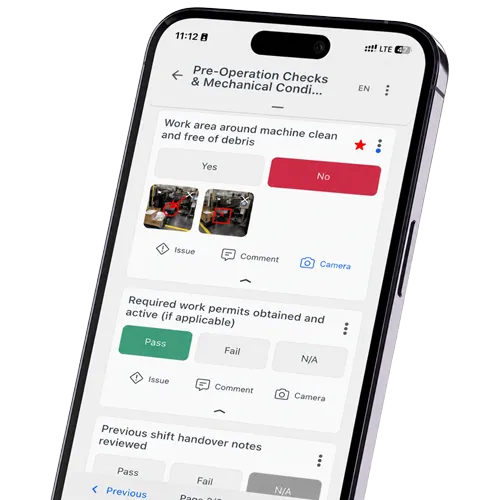
2. Data capture at the point of origin: The technician completes the inspection directly at the asset instead of transferring the information later in the office. This eliminates the need for data transfer, and with it the most common source of error.
3. A defined trigger: The completion of an inspection step generates the record. The system creates it, not a person who remembers to do so. The trigger is unambiguous.
4. Approval within the system: Status, inspector and timestamp are generated where the work takes place. Subsequent filing is handled by document management in production. Approval by email attachment creates a queue rather than a traceable release.
If any one of the four is missing, manual work will remain at precisely this stage. Most projects start with the second because it delivers visible results, while the first is often overlooked. The consequences usually become apparent during the first audit.
Can Every Documentation Step Be Automated?
Structured, recurring information with a clear trigger can be automated. Everything else requires a technical assessment by a person.
Easily automatable
- Inspection and maintenance records from scheduled jobs
- Readings, meter counts and sensor data
- Photographic and defect documentation from site inspections
- Timestamps, person responsible, approval status, revision status
- Assignment of a document to equipment, location and cost centre via metadata
Cannot be automated
- Assessing whether a finding is safety-relevant
- Deciding whether a change requires documentation
- Checking whether a manufacturer’s documentation is complete and accurate in terms of content
- The technical interpreting of older legacy documents that carry no metadata
Ignoring this limit produces a system full of files that still says nothing reliable about the condition of the asset. In maintenance management software, automation extends only as far as the triggering process is clearly defined.
How Documents Stay Linked to the Correct Asset
Each asset receives a unique ID when it is created in the system. Every document generated for that asset is then linked to the same ID. The technician identifies the asset via a QR code, NFC or by selecting it from the asset list. Everything created subsequently inherits the asset ID, timestamp, inspection step and user. This means that a photo taken in January can still be assigned to the correct asset in September, without consulting the person who took it.
One detail decides whether this holds up over time: the QR code on the machine should point to the permanent asset URL, not to a single PDF file. Otherwise, after the first revision, it will invariably lead to an out-of-date version.
A document management system such as DocuWare can manage version status, access rights and retention periods. The benefit arises once the DMS holds the same asset ID as the inspection order. Without this link, even a good DMS remains little more than a better filing system.
Contents of a Digital Machine Record
The machine file serves as the central hub for everything relating to a piece of equipment, accessible via an ID rather than by physical location. It contains:
- Master data: manufacturer, type, serial number, year of manufacture, location, cost centre
- Applicable regulatory and conformity documentation, such as declarations of conformity, CE-related documentation where required, and relevant risk assessments
- Manufacturer’s documentation — operating instructions, circuit diagrams, spare parts lists and, where applicable, structured documentation packages such as VDI 2770
- Every inspection and maintenance report, including date, person carrying out the work and result
- Modifications and technical alterations, including the current as-built status
- Defects with status and proof of resolution
- Training records and work authorisations for personnel assigned to the equipment
Whether this file is stored in the document management system, in the maintenance software or in both is of secondary importance. What matters are the metadata and a consistent assignment.
Downtime from missed maintenance?
Plan maintenance, track actions, detect failures earlier.
European Requirements for Digital Machinery Documentation
Two sets of rules shape digital machinery documentation in Europe. VDI 2770 is a guideline and applies only if it is written into the contract. Regulation (EU) 2023/1230 becomes binding on 20 January 2027.
VDI 2770: manufacturer documentation an operator's system can read
The guideline defines classification, metadata and permitted formats. What arrives is a structured container of PDF/A documents and XML metadata that can be imported and mapped without manual sorting.
It says nothing about completeness, technical review or change management. Structure is guaranteed, content is not. For procurement: name VDI 2770 in the delivery terms and define completeness requirements alongside it.
Regulation (EU) 2023/1230, from 20 January 2027
Digital instructions for use are expressly allowed. The manufacturer states how to access them and provides them in a printable, downloadable format. They must stay accessible for the expected lifetime of the machinery and at least ten years after it is placed on the market. A paper copy requested at the time of purchase is free and due within one month.
Machinery placed on the market before that date stays under Directive 2006/42/EC — no rework, no transition window. One exception concerns operators directly: anyone who substantially modifies existing machinery, physically or through software, counts as the manufacturer under Article 18 and inherits those obligations, documentation included.
At acceptance, check two things: that digital access works, and that the documentation sits in your own system. A manufacturer-hosted link is outside your control, and the machine still has to be documented in ten years.
Which Assets Should You Digitise First?
One of the most common misconceptions regarding digitisation projects is that the entire legacy archive must be digitised first. Many plants hold records spanning several decades. Scanning, classifying and tagging everything with metadata involves a considerable amount of effort and changes little in day-to-day operation.
It makes more sense to prioritise according to criticality.
-
Prioritise equipment subject to mandatory inspections and safety-critical assets: Here, supporting documentation must be reliably available. A missing document has immediate operational consequences.
-
Prioritise bottleneck systems: Where a shutdown affects entire production areas, the value of up-to-date technical information is greatest.
-
Include assets with upcoming modifications: Their current documentation status must be reviewed anyway, so the documentation assessment also serves an immediate operational purpose.
-
Include only active documentation: For older plant, the initial focus should be on recording what is actually required for operation, testing, maintenance and modification. Historical documents remain in the archive.
-
Record new documentation in a structured manner from a specified date: It is crucial that no new documentation backlog arises from this point onwards.
-
Require standardised manufacturer information in future: For new procurements, requirements regarding structure, formats and metadata can already be included in the terms of delivery. VDI 2770 offers a standardised approach for this, particularly in the process industry.
The usual mistake runs in the reverse order: scan first, then structure. This creates a large digital archive, but not necessarily a usable equipment record.
Why Structured Asset Data Comes Before AI
AI can also process unstructured documents, but reliable and scalable automation depends on current information, consistent metadata and a clear link to the relevant asset. Scanned PDFs without consistent metadata can still be analysed, but the lack of asset context, document type and revision information makes the results harder to trust and much harder to automate.
Three factors determine whether AI delivers usable results here:
- Structure: A measured value in a structured 'Oil pressure' field can be analysed consistently. The same value embedded in free text may also be extracted, but with greater ambiguity and less reliability.
- Timeliness: If a system relies on outdated documentation, it may generate recommendations based on a machine configuration that has since changed.
- Asset reference: Without a consistent asset ID, it becomes much harder to reliably determine whether recurring faults are associated with a particular model series, site or operating context.
Anyone planning AI-based assistance or predictive applications should therefore establish a reliable data foundation first. The quality of the resulting automation depends heavily on it.
Four Criteria for Assessing Documentation Maturity
Four observations that can be verified without the need for project reporting:
- Technicians can locate the current drawing without needing to make further enquiries.
- No further steps are required between the inspection and the finalised evidence.
- Following a modification, the documentation is updated before the asset is restarted.
- Prior to an audit, there is no need to gather documents at short notice or prepare them retrospectively.
If any of these criteria is not met, the relevant process step still involves manual or organisational effort. That step is where further optimisation of the documentation process begins.
Start with the Information Flow, Not the Archive
Anyone wishing to improve plant documentation should not start by scanning the next folder, but should instead consider a document’s journey: Where is the information created? Who transfers it? Who checks it? How is it assigned to an asset? Where is it approved, and how does the next employee locate it?
System boundaries often lead to gaps in information. Inspection results are generated in the field, master data is stored in the ERP system, and documents are held in the file system or in the DMS. Without consistent mapping, multiple versions and documentation states can exist in parallel across different systems. During an audit, the problem is often not missing evidence, but evidence that cannot be reliably linked to the correct asset, inspection or revision. Structured inspection processes, combined with a document management system such as DocuWare, bridge these gaps: both within a single site and across multiple plants.
Authorized DocuWare Partner
How long does it take to retrieve the last inspection record for a single machine?
The answer says more about your documentation than any strategy paper. In a 20-minute call we walk through one real case with you: from the inspection at the asset, through sign-off, to the filed record. No preparation needed.
FAQ | Industrial Plant Documentation
What does plant documentation consist of?
Manufacturer information such as instructions, declarations of conformity and certificates; technical documentation such as circuit diagrams, P&IDs and parts lists; and operational records of inspections, maintenance and modifications. The scope depends on the type of installation and the rules that apply to it. Each document should be linked to a clearly identified asset.
What is the difference between plant documentation and machinery documentation?
Machine documentation describes a single machine and includes the operating instructions, risk assessment and conformity documents.
Plant documentation covers the complete technical system: machinery, piping, electrical and instrumentation systems, the interfaces between them, and the associated operating and test records.
Which rules apply to plant documentation?
There is no single standard. EU product law defines what the manufacturer must supply; Regulation (EU) 2023/1230 applies from 20 January 2027 and replaces Directive 2006/42/EC. National health-and-safety law defines what the operator must inspect and record, for example BetrSichV and the TRBS in Germany or PUWER in the UK. Structure and classification are covered by voluntary standards, mainly IEC 81346, IEC 61355 and VDI 2770.
How long must records relating to plant documentation be kept?
Two separate duties apply. The manufacturer keeps the technical file and the EU declaration of conformity for ten years after the machinery is placed on the market, and digital instructions must remain accessible for the expected lifetime of the machine and for at least ten years. The operator’s retention period follows national law. In Germany, inspection records must be kept at least until the next inspection, and for certain work equipment for its entire service life.
Who is responsible within the company?
Responsibility lies with the operator, meaning the employer who puts the installation into service. The duties are usually delegated in writing to maintenance, EHS or quality management. A person appointed this way becomes a duty holder in their own right and can be held liable, while selection, instruction and supervision remain with the employer. The manufacturer remains responsible for the technical file and the instructions supplied with the machine.
What happens during an official inspection if documents are missing?
If required documents cannot be presented, the authority can set a deadline for producing or reconstructing them, require additional testing, impose conditions, or restrict operation until the gap is closed. The consequences depend on the area of law and the risk involved. In many cases the record exists but cannot be assigned to the asset being inspected, which is treated the same as a missing document.
What happens to documentation after a modification?
The as-built status must be updated before the plant is put back into operation. If the change qualifies as a substantial modification, the operator assumes manufacturer duties and must draw up instructions for the modified machine under Articles 17 and 18 of Regulation (EU) 2023/1230. Machinery placed on the market before 20 January 2027 keeps its status under the old directive until such a modification is made.
How do inspections, photos and readings end up on the right machine?
Through an asset ID assigned at the time of capture rather than through a storage location. The technician identifies the asset by QR code, NFC or from the asset list, and everything recorded afterwards inherits the asset ID, timestamp, inspection step and user. When the inspection is completed, the report is transferred to the DMS, CMMS or ERP with the asset ID attached.
How are photos, defects and measurement readings automatically assigned to the correct machine?
The asset is identified via QR code, NFC or asset selection. All photos, measurement values and defects recorded thereafter automatically include the asset ID, timestamp, inspection step and user, and thus remain clearly traceable.
How do you make sure people work from the current version?
Each document needs a document number, revision, approval status and change date. Operational access shows only the currently approved revision, while superseded revisions remain in the history in an audit-traceable form. The QR code on the machine should point to the permanent asset URL rather than to an individual PDF file.
Which software is suitable for automated plant documentation?
DMS/ECM systems cover documents and retention, CMMS/EAM systems cover maintenance and asset history, PLM/CAE covers engineering data, and checklist software covers inspections and field data capture. Most plants use a combination of two or three. Selection criteria include asset structure, version control, mobile capture, QR identification, audit trails and available interfaces.