Skip to content
 EN
EN  DE
DE  العربية




Summary: Are maintenance schedules, checklists, and feedback scattered across multiple Excel files, while coordination between planning and the shop floor is taking up more and more time? Especially when multiple pieces of equipment, shifts, or locations are involved, it becomes difficult to keep track of which version is current, which maintenance tasks are overdue, and whether documentation is complete. However, a digital maintenance plan does not solve this problem simply by importing a spreadsheet. What matters is turning static rows into one connected process, from the due date to the confirmed completion. This guide shows how to move from Excel to a CMMS step by step. You’ll also learn how to clean your data before import and measure whether the transition has improved the maintenance process.
Key Facts
- With a growing number of assets, multiple locations, and work requiring documentation, Excel quickly becomes a risk for planning, accountability, and record-keeping.
- A CMMS connects due dates, work orders, checklists, findings, and completion records in one traceable process.
- For a controlled transition, we recommend a defined pilot area with cleaned-up asset data, clearly defined responsibilities, and real maintenance orders.
- Do not phase out Excel Do not phase out Excel until master data, scheduling rules, mobile execution, escalations, and reporting work reliably within the pilot area.
- Process metrics such as schedule compliance, overdue work orders, reporting time, and documentation completeness show whether the transition is working. MTTR, equipment availability, and unplanned downtime require a longer observation period.
Do you lack an overview of pending maintenance tasks?
flowdit displays tasks, deadlines, and results right where the work is being done.
When Does Excel Become a Risk in Maintenance Planning?
Excel isn’t inherently unsuitable. A well-structured spreadsheet can serve as a practical starting point for a preventive maintenance plan when dealing with a small fleet of machines. The risk arises when the file is expected to handle tasks for which a spreadsheet isn’t designed: managing recurring work orders, assigning clear responsibilities, recording completion data from the shop floor, and maintaining a traceable asset history.
Typical warning signs include:
- Multiple copies of the same maintenance list are scattered across emails, local folders, and network drives.
- Due dates are tracked using colors, filters, or personal calendar entries.
- Planners transfer data from Excel to paper forms, emails, or ticket systems.
- Maintenance technicians report results verbally, by phone, or via messaging apps.
- Photos, measurement values, signatures, and test reports cannot be unambiguously assigned to a specific work order or piece of equipment.
- During absences or shift changes, it is unclear which tasks are pending, in progress, or completed.
- The next due date is not consistently recalculated after a work order is completed.
- For audits, supporting documentation must be gathered retrospectively from various folders.
Excel reaches its practical limits when several roles must be coordinated and the current status of a maintenance task can no longer be determined from a single reliable source.
The Hidden Costs of Excel-Based Maintenance Planning
The cost of Excel licenses is rarely the problem. It’s the manual tasks involved in handling the file that end up being expensive.
Time Spent Searching and Coordinating
Planners check due dates, request feedback, and search for equipment information. Technicians, on the other hand, need up-to-date work instructions, safety information, spare parts data, and previous findings. If this information is scattered across different systems and folders, technicians lose time searching before they can begin or complete the work.
Duplicate Data Entry
A typical break in the data flow begins with a row in Excel, continues with a printed work order, and ends with manual data entry into another system. This creates transcription errors, incomplete records, and delays. It’s particularly problematic when the same asset and work order data is also maintained in ERP, MES, or email systems.
Overlooked Deadlines and Unclear Priorities
A colored cell does not constitute an escalation. While Excel can calculate due dates, it does not automatically ensure that the right employee receives a task, that a substitute steps in, or that overdue maintenance is escalated to the responsible party.
Incomplete Records
A “completed” entry alone does not show who performed the work, when it was completed, which instruction version was used, or what results were recorded. For safety-critical equipment, this lack of traceability creates operational and compliance risks. Depending on the equipment and type of inspection, additional requirements may apply to the content and retention of inspection records.
Lack of a Data Foundation for Improvements
Free-text entries and inconsistent status values are difficult to compare. As a result, there are no reliable answers to questions such as: Which systems require a particularly high volume of follow-up work? Which maintenance tasks are regularly postponed? Which issues recur despite scheduled maintenance?
What Changes When Maintenance Moves from Excel to a CMMS?
A CMMS connects maintenance plans, work orders, checklists , and asset histories in one system. Based on configured scheduling rules, it can generate a work order containing the asset, due date, priority, responsible person, and current work instructions.
In everyday practice, this means:
- Clear due dates: Recurring maintenance tasks are scheduled based on time or usage and escalated as needed.
- Clear responsibilities: Tasks can be assigned to teams, roles, or individual employees and reassigned in case of absence.
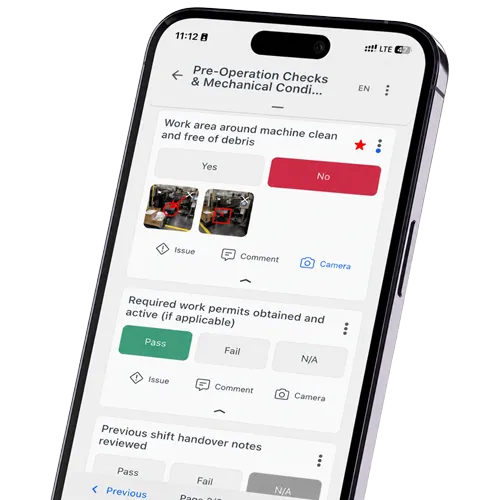
- Mobile execution: Technicians see what needs to be done at the equipment and record measurements, photos, comments, or signatures directly on-site.
- Guided workflows: Required fields, threshold values, and conditional steps prevent relevant checkpoints from being skipped.
- Current status: Planning, production, and maintenance teams can see whether a work order is open, in progress, paused, overdue, or completed.
- Traceable history: Maintenance records and findings remain linked to the correct asset and work order.
- Faster response to deviations: A critical finding can directly trigger a fault report or a follow-up task.
Important: Software alone does not automatically make a process legally compliant or audit-ready. To achieve this, responsibilities, inspection scope, personnel qualifications, approval procedures, retention periods, and change documentation.
Downtime from missed maintenance?
Plan maintenance, track actions, detect failures earlier.
How to Move from Excel to a CMMS in 8 Steps
The transition should begin in a defined area of the facility. This allows data quality, scheduling logic, and mobile execution to be tested under real-world conditions without unnecessarily disrupting ongoing production operations. The process should be rolled out to additional asset groups, production lines, or locations only after it works reliably within the pilot area.
1. Determine the Starting Point and Objectives
Identify which Excel files, asset lists, work instructions, calendars, and locally stored documents are currently used for maintenance planning. Then set measurable goals, such as fewer overdue orders, higher on-time performance, shorter response times, or more complete maintenance records.
2. Define the Pilot Area
Select a manageable family of Select a manageable group of assets that covers different maintenance types and generates enough real work orders for a meaningful test. The pilot should also include checks of measured values, approvals, and corrective follow-up actions so that more than just simple visual inspections are tested. Master data preparation, test imports, and training should take place outside of critical production windows.
3. Clean Up Machine, Equipment, and Maintenance Data
Establish a single authoritative asset master and assign a permanent, unique ID to each asset. Standardize designations, locations, units, status values, and equipment hierarchies. Resolve duplicate records using serial numbers, manufacturer data, location, and technical function. Assign existing histories and documents to the verified master record.
Missing maintenance intervals must not be filled in with blanket default values. Maintenance intervals must be defined using manufacturer specifications, operating conditions, asset criticality, risk assessments, and documented failure data. An authorized technical expert should review and approve them.
For the basic steps of defining intervals and tasks per asset, see our guide on creating a maintenance schedule.
4. Map Excel Columns to the CMMS Data Model
Before importing, assign each relevant Excel entry to a defined target field. This keeps the imported data structured and analyzable instead of transferring important information into unsearchable free-text fields.
| Excel column | Target field in the CMMS | Check before import |
|---|---|---|
| Machine/asset | Asset name | Is the name unique? |
| Inventory or machine number | Asset ID | Is the value unique and permanent? |
| Location/area | Asset hierarchy | Is there a consistent naming scheme? |
| Maintenance type | Maintenance plan or template | Are the tasks clearly separated from each other? |
| Interval | Scheduling rule | Is maintenance based on days, weeks, months, operating hours or meter readings? |
| Last maintenance | Last confirmed completion | Is there reliable proof that the work was actually done? |
| Next maintenance | Next due date | Was the due date calculated automatically or entered manually? |
| Responsible person | Role, team or user | What happens during absences or shift changes? |
| Status | Work order status | Are values such as “open”, “in progress” and “done” clearly defined? |
| Remarks | Structured finding or note | Does the free text contain information that needs its own data field? |
| Document link | Attachment or document | Is the document accessible, up to date and linked to the correct asset? |
5. Set Up Maintenance Rules and Responsibilities
Transfer maintenance content into approved templates with clearly defined work steps, inspection characteristics, qualifications, and escalation paths. Define who performs, reviews, and closes work orders and who is authorized to change asset data, templates, or maintenance intervals. The next due date must come from a checked scheduling rule, not from a date someone typed into Excel. Template changes should take effect only after approval. Completed work orders must retain the instruction version used during execution so that the record remains traceable.
6. Perform a Test Import and Practical Test
First, import a small, technically verified data set. Verify the number of records, asset relationships, units, date formats, intervals, and calculated due dates. Review pending and overdue tasks separately before transferring them as active work orders with verified due dates and assigned responsibilities.
Authorized and appropriately qualified maintenance personnel then process real work orders on the shop floor. The trial should test automatic work-order generation, offline use, barcode or QR-code scanning, and the capture of photos, measured values, and findings under real operating conditions.
7. Evaluate and Refine Results
Compare schedule compliance, overdue work orders, reporting time, and documentation completeness with the baseline recorded before the pilot. Correct erroneous data, scheduling rules, templates, and roles before adding additional equipment. Short training sessions based on real work orders prepare users more effectively than a general software presentation.
8. Replace Excel and Continue the Rollout
Set a mandatory migration deadline for the pilot area. The last approved Excel version is archived as read-only with the date and migration status; after that, the CMMS becomes the system of record for maintenance planning and execution. Additional asset families, lines, or locations are migrated step-by-step using the same proven model.
Best practice: The key is not to import as many Excel rows as possible. What is needed is a consistent maintenance process that clearly links the asset, due date, scope of work, responsibility, confirmation, and follow-up action.
Which KPIs Show Whether the Transition Is Working?
Establish a baseline before the pilot. Otherwise, while you’ll be able to show later that the new system is being used, you won’t be able to demonstrate whether the process has improved.
| KPI | Calculation | What it shows |
|---|---|---|
| Schedule compliance | Maintenance tasks completed on time ÷ maintenance tasks due × 100 | Are planned maintenance tasks completed on time? |
| Plan completion rate | Completed planned work orders ÷ planned work orders × 100 | How reliably is the maintenance plan carried out? |
| Overdue maintenance rate | Overdue open maintenance tasks ÷ open maintenance tasks × 100 | In which areas is a maintenance backlog building up? |
| Reporting time | Time between execution and complete reporting | How quickly are maintenance results available digitally? |
| Documentation completeness | Fully documented work orders ÷ completed work orders × 100 | Are required fields, measurements, photos and approvals all in place? |
| Follow-up action rate | Findings with a follow-up action created ÷ findings requiring action × 100 | Are identified deviations consistently followed up? |
| Search and planning time | Time spent checking due dates, searching for information and transferring data manually | How much does administrative effort in maintenance go down? |
| Unplanned downtime | Total unplanned downtime in the period under review | Is equipment availability improving over the long term? |
In the short term, focus primarily on process metrics. Metrics such as MTBF, MTTR, equipment availability, or maintenance costs are influenced by many factors and usually require a longer comparison period. Improvements in these metrics should not be attributed to the software alone without examining changes in staffing, production volume, asset condition, and maintenance strategy.
7 Mistakes When Replacing Excel in Maintenance
The Excel file is rarely the actual problem. More often than not, it merely highlights that data, roles, or workflows aren’t clearly defined.
⚠️ 1: Digitizing a poor process without changing it
If you carry over unnecessary approvals, duplicate data entry, and unclear status values exactly as they are, you’ll end up with a poor process on a screen. Simplify the workflow before the technical implementation.
⚠️ 2: Importing Unverified Master Data
More data does not automatically mean more transparency. Duplicates, outdated assets, and inconsistent terminology undermine planning and analysis from the very beginning.
⚠️ 3: Selecting the solution without involving maintenance staff and operators
The people who perform maintenance and report malfunctions must test typical tasks on the mobile device. Good desktop planning is of little help if providing feedback at the equipment requires too many steps.
⚠️ 4: Underestimating mobile use and offline operation
Check wireless coverage, device suitability, the camera, operation while wearing personal protective equipment, and synchronization. In warehouses, basements or outdoor areas, working offline is often a hard requirement. It is not a nice extra.
⚠️ 5: Treating the CMMS, ERP, MES, and Equipment Data as Separate Systems
Not every solution needs to be fully integrated right away. However, system ownership and future data flows should be defined from the start to prevent duplicate master data and manual re-entry.
⚠️ 6: Introducing too many features in the initial rollout
Start with a stable core: equipment, preventive maintenance, mobile data entry, deviations, and documentation. Spare parts management, condition monitoring, or complex analyses can follow once the core process is running reliably.
⚠️ 7: Failing to assign responsibility for data quality
Designate responsible parties for asset master data, maintenance templates, intervals, and user roles. Data quality is not a one-time task during migration but an ongoing process.
When Is Excel Still Sufficient for Maintenance Planning?
Excel is sufficient when only a few people manage a manageable, stable fleet of equipment, maintenance intervals are rarely changed, and there is no need for mobile status updates or complete inspection records. A facility with 40 pieces of equipment and a single maintenance technician often operates more cost-effectively using a well-maintained spreadsheet than with software that has only been partially implemented. Excel also remains a practical choice for analyses and data exports.
A CMMS pays off once several shifts, sites or contractors are involved. The same goes for deadlines that need automatic monitoring and records that customers, quality or occupational safety ask for. The same applies when findings trigger follow-up tasks, measured values need to be compared, or data needs to be exchanged with ERP and MES systems.
The decisive factor is not the number of machines, but the effort required for coordination and documentation. If feedback, file versions, and missing documentation are regularly processed manually, Excel has reached its practical limits.
How to Test a CMMS with Real Maintenance Work
Do not evaluate a CMMS using only a predefined sales demonstration. Test it with a representative maintenance process and the mobile device technicians would actually use on the shop floor.
- Complete a scheduled inspection containing measured values and tolerance limits.
- Record a NOK result and verify that it automatically creates or requires a follow-up action.
- Change a maintenance interval or checklist and confirm that future work orders use the new version while completed records remain unchanged.
- Complete a work order without network access and verify that all data synchronizes correctly after reconnecting.
- Check whether photos, measurements, comments, and approvals remain linked to the correct asset and work order.
How flowdit Turns Excel Maintenance Plans into Digital Workflows
With flowdit, you move existing maintenance plans, checklists and asset structures into a digital process one step at a time. Recurring tasks are scheduled and assigned; authorized employees complete maintenance work on a mobile device, capture photos, measured values, and deviations, and document the results directly at the asset—even without a network connection.
Instead of simply replicating Excel, flowdit combines planning and execution: Rules govern required fields and follow-up actions, open items remain traceable, and reports are available without manual compilation. You don't have to rebuild your checklists by hand. flowdit’s AI-assisted import helps convert Excel, Word, PDF, and photographed paper forms into editable digital checklists. Measurement fields can include tolerance limits, while workflow rules can require a follow-up action whenever a NOK result is recorded. ERP and MES systems can be connected through APIs and configured interfaces .
How would your current Excel maintenance plan look in flowdit?
Pick one representative maintenance process. We go through it together, from the data import to the feedback on the mobile device, and you see where flowdit replaces your spreadsheet and where it goes beyond it.
Book a demo ›20 minutes · bring your maintenance plan as an Excel file
FAQ | Replacing Excel in Maintenance
How does a maintenance schedule differ from a repair schedule?
The maintenance schedule covers scheduled, preventive activities, such as lubrication, cleaning, adjustment, and replacement of wear parts.
The maintenance plan is the overarching framework and also includes inspection, repair, and improvement measures. In practice, the terms are often used interchangeably, which leads to gaps in inspection planning.
What risks arise when multiple employees edit the same maintenance list in Excel?
Multiple employees editing the same maintenance list can cause version conflicts, overwritten entries, and uncontrolled local copies. Even collaborative editing requires compatible Excel versions and properly configured cloud storage. Moreover, cell changes alone do not provide a controlled maintenance workflow with defined roles, approvals, and escalations.
How many machines or employees does it take before a CMMS pays off?
There is no fixed minimum. The key factors are asset criticality, maintenance frequency, documentation requirements, and coordination effort. A CMMS can be cost-effective for ten critical machines, while 100 low-maintenance assets may still be manageable in Excel. Clear indicators include multiple technicians or shifts, frequent handovers, recurring documentation gaps, and maintenance tasks that are regularly missed or delayed.
How much does it cost to switch from Excel to digital maintenance software?
The total cost includes software licenses, data cleansing and import, system configuration, training, integrations, and internal project resources. With clean asset data and standard workflows, implementing a SaaS solution is usually straightforward. Custom ERP integrations, complex asset hierarchies, and unverified legacy data can significantly increase the implementation effort and cost.
What data is imported from the Excel maintenance schedule?
Typical fields include the asset ID, description, location, maintenance type, interval, last confirmed completion, next due date, and responsible person. Open work orders and historical records should be reviewed and imported separately. Only unique and technically verified data should be transferred; duplicates, free-text entries, and manually calculated dates require careful validation.
How long does it take to switch from Excel to a digital system?
The technical setup can often be completed within a few days, but the overall timeline depends mainly on data quality, process complexity, and integration requirements. Companies that start with a defined pilot area and test it for four to six weeks usually achieve a stable rollout faster than those migrating all assets at once. In most projects, data cleansing, validation, and process configuration require more effort than the software setup itself.
Is a digital maintenance schedule automatically audit-compliant?
No. Key factors include, among others, unique users, roles, and permissions; traceable changes; required fields; approvals; timestamps; and defined retention and export procedures. The configuration must comply with your standards, contracts, and legal requirements. Software provides the technical foundation but does not replace a professional review of the process.