Summary: Work order software helps organizations plan, assign, track, and close maintenance tasks across equipment, facilities, and service workflows. It gives teams a clearer way to coordinate work, improve accountability on the shop floor, and keep documentation audit-ready, whether that means scheduling preventive maintenance, managing reactive repairs, or logging inspections directly on-site. But which of these platforms actually deliver on that promise? The 2026 market includes a broad spectrum of tools: from lightweight standalone work order systems to full CMMS platforms with asset management, spare parts inventory, and contractor portals. This overview evaluates leading work order software products based on functional depth, usability in the field, documentation quality, and practical deployment requirements, so you can identify the solution that matches your workflows, not the one with the longest feature list.
What Is Work Order Management Software?
Work order management software is a digital system used to organize maintenance activities, inspections, quality checks and operational tasks across an organization. It brings work orders, standard operating procedures, safety checks, inventory-related tasks and documentation into one structured process.A work order can be anything that needs to be done, checked, fixed, approved or followed up, for example:
- Repairing a machine
- Performing preventive maintenance
- Documenting a safety issue
- Assigning a corrective action
- Inspecting equipment
- Completing a quality check
- Handling a facility request
- Tracking field service work
- Closing an audit finding
- Following up on a failed checklist item
For maintenance teams, the software makes it easier to distribute work among technicians, set priorities, monitor progress and keep a reliable history of every task. The goal is simple: every work order should have a clear owner, due date, status, priority, documentation and history.
Why Work Order Software Has Become a Business-Critical System
Maintenance and operations have changed. Many teams are no longer looking for a basic digital ticket system. They need a platform that connects daily execution with reliability, safety, documentation, and reporting.
The pressure comes from several sides.
Unplanned downtime is still one of the biggest operational problems. Spare parts are often missing when they are needed. Technicians lose time searching for information. Work requests come in from different channels. Reports are created manually after the work is already finished.
At the same time, audits and compliance checks expect clear evidence. It is no longer enough to say that maintenance was done. Teams need timestamps, photos, completed checklists, signatures, corrective actions, and a traceable history.
This is why the best work order software in 2026 combines work orders with asset management, preventive maintenance, mobile execution, inventory, analytics, and structured documentation.
Still managing work orders instead of moving work forward?
With flowdit, inspections, tasks, actions and reports stay connected, so your team gets from issue to resolution faster.
Where Work Order Processes Break Down in Manufacturing
Work order processes often break down at the handover points between request, planning, execution, and closure. A maintenance issue may be reported without asset context, assigned without a clear priority, executed without reliable instructions, or closed without enough evidence to prove what was done. Once requests, checklists, photos, spare parts, approvals, and corrective actions are managed in separate places, teams lose control over status, responsibility, and follow-up. Strong work order software reduces these gaps by connecting the task, the asset, the technician, the execution steps, the documentation, and the final report in one traceable workflow.
What Features Should the Best Work Order Software Include?
Work order software should do more than move tasks from paper into a digital format. It should guide the full process from request intake to completion while keeping every step clear, traceable, and easy to execute in the field.
Request Intake, Assignment, and Prioritization
A strong system should capture work requests in a structured way and make it clear what needs to be done, how urgent it is, who is responsible, and when it is due. This helps teams separate routine tasks from urgent repairs, inspection findings, and corrective actions before work gets lost in emails, spreadsheets, or paper forms.
Mobile Execution in the Field
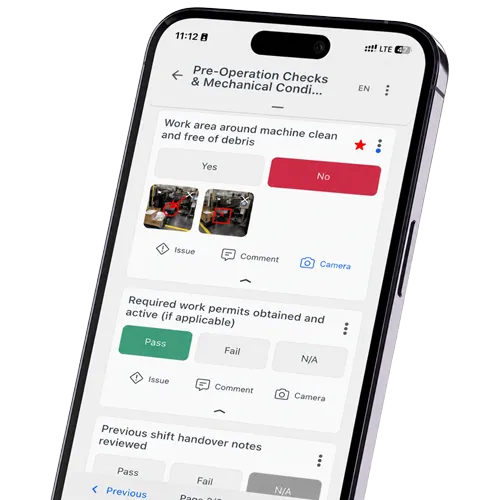
Good work order software must work reliably on smartphones and tablets so technicians can complete tasks where the work actually happens. This includes checklists, photos, comments, digital signatures, timestamps, document access, and the ability to open asset information directly through QR codes or barcodes.
Offline Capability for Industrial Teams
Factories, basements, warehouses, remote sites, and construction areas do not always have stable internet access. That is why work order software should also work offline and automatically sync all data once a connection is available again.
Asset References and QR Code Access
Every work order should be linked to the right asset, location, machine, or equipment record. QR code and barcode access make this faster in practice because technicians can scan the asset on site and immediately see the relevant task, history, documents, and open actions.
Documentation with Reliable Evidence
Every step should be documented with clear proof, including photos, comments, inspection results, signatures, timestamps, and asset references. This allows structured completion reports to be created directly from the completed work instead of being rebuilt manually afterward.
Role-Based Permissions and Audit Trails
Industrial work order processes often involve different roles, from technicians and supervisors to quality, maintenance, and management teams. Role-based permissions help control who can create, edit, approve, close, or review work orders, while audit trails show what changed, when it changed, and who was responsible.
Recurring Tasks, Escalations, and CAPA Workflows
Recurring tasks, deadlines, approvals, and escalation rules should be managed automatically. For quality and safety-related issues, CAPA workflows are especially important because they connect findings with corrective and preventive actions, responsibilities, due dates, and proof of completion.
Clear Separation of Work Types
A good system should clearly separate planned work, reactive work, inspection findings, and corrective actions. Without this structure, teams often end up with a digital version of the same messy paper process instead of a reliable work order workflow.
Comparison Table: Best Work Order Software of 2026
| Provider | Core focus | Key features | Platform | Integrations / API | Trial / demo | Public pricing |
|---|---|---|---|---|---|---|
| flowdit | Inspection, checklist, audit, SOP and action management for operational processes. |
| Web, iOS, Android. | ERP, MES, CMMS and third-party system integrations mentioned publicly. Specific API scope not publicly detailed. | Free version and demo available. | Not publicly listed. |
| MaintainX | CMMS and maintenance operations platform. |
| Web, iOS, Android. | Open REST API access from Premium. IoT integrations on Enterprise. | Free Basic plan. Paid plans offer trial access. | Basic $0. Essential $20 annually / $25 monthly. Premium $65 annually / $75 monthly. Enterprise custom. |
| Limble CMMS | CMMS for maintenance, work orders and asset management. |
| Web and mobile app. | Open REST API access from Premium+. ERP, IoT and business system integrations available from Premium+ or Enterprise, with additional costs possible. | Demo / price calculation available. | Plan structure listed publicly. Standard, Premium+ and Enterprise available. Fixed public prices are calculated or provided on request. |
| Fiix | CMMS for maintenance planning, work orders and asset management. |
| Web and mobile app. | Integration Hub, ERP integrations and custom API integrations available on Enterprise, partly as add-ons. | Free plan available. Demo available. | Free $0. Basic $45/user/month. Professional $75/user/month. Enterprise custom. |
| UpKeep | Asset operations and maintenance management. |
| Web and mobile app. | API and custom integrations on Professional and Enterprise plans. | Free trial. Demo available for higher plans. | Essential $24/user/month. Premium $55/user/month. Professional and Enterprise custom. |
| Fracttal One | CMMS / EAM platform for maintenance management. |
| Cloud platform and mobile app. | Integrations with ERP and business applications promoted publicly, including SAP, SAP PM, Oracle, Microsoft Dynamics and Google Sheets. API, IoT and integration scope depends on requirements and plan. | Free version / demo / pricing request. | Public fixed pricing not listed. Pricing on request. |
| Click Maint | Simple CMMS for work orders, requests and preventive maintenance. |
| Web and mobile app. | API documentation linked publicly. | 30-day free trial. Demo available. | $42/user/month monthly or $35/user/month yearly. Custom pricing available on request. |
| IBM Maximo Application Suite | Enterprise asset management, asset performance and maintenance platform. |
| SaaS or client-managed software. | IBM ecosystem, asset data, analytics and enterprise integrations. Licensed via AppPoints. | Product tour, free trial and live demo options. | AppPoints-based licensing. Public fixed per-user pricing not listed by IBM. |
Best Work Order Software 2026: Full Comparison
The following overview is based on publicly available product information, official vendor websites, pricing pages where available, and review-platform insights. It focuses on practical work order execution, maintenance documentation, mobile usability, reporting, and deployment fit.
flowdit
flowdit is a CMMS, inspection and action management platform for companies that need to plan, assign and document operational work directly on site. The platform connects maintenance tasks, work orders, inspections, digital checklists, SOPs, issue tracking, corrective actions, reports and multilingual workflows in one structured process. This makes flowdit suitable for maintenance documentation, asset-related checks, safety inspections, quality controls and follow-up actions across different locations.
Advantage: Work orders, inspections, checklists, actions, offline work, reports and audit-ready documentation in one connected workflow.
Potential drawback: Less focused on spare parts purchasing, inventory costing or broad enterprise asset lifecycle planning.
Focus: CMMS workflows, digital inspections, work orders, SOPs, corrective actions, offline documentation and audit-ready reporting.
MaintainX
MaintainX is a maintenance and asset management platform built around work orders, preventive maintenance, procedures, asset and location management, inventory-related workflows and team communication. The product is mainly positioned for maintenance teams that want to organize daily work orders, recurring tasks and asset records in a mobile-friendly system.
Advantage: Work orders, preventive maintenance, procedures, asset records, inventory workflows, communication, reporting and mobile execution.
Potential drawback: More maintenance-centered than inspection-first or audit-first software with deeper documentation workflows.
Focus: Work orders, preventive maintenance, procedures, asset management, requests, inventory workflows, reporting and team communication.
Limble CMMS
Limble CMMS is a maintenance management platform for work orders, preventive maintenance, asset management, parts and inventory, vendor management, dashboards and maintenance reporting. It is often considered by teams that want a daily-use CMMS with a clean structure for recurring work, asset histories and maintenance planning.
Advantage: Work orders, preventive maintenance, asset tracking, parts inventory, reporting, mobile access and maintenance visibility.
Potential drawback: Primarily CMMS-focused, so advanced inspection logic, audit workflows and corrective actions should be checked.
Focus: Work orders, preventive maintenance, asset management, parts, inventory, vendors, dashboards and maintenance reporting.
Fiix
Fiix is a cloud-based CMMS for maintenance planning, work orders, preventive maintenance, asset management, inventory, downtime tracking and maintenance reporting. The software is positioned for teams that need a structured maintenance system with asset histories, scheduled tasks and reporting rather than a lightweight checklist tool.
Advantage: Work orders, preventive maintenance, assets, inventory, downtime tracking, reporting, integrations and AI-supported maintenance tools.
Potential drawback: More CMMS-driven than inspection, SOP execution or audit documentation software.
Focus: CMMS, work orders, preventive maintenance, asset management, inventory, downtime tracking and maintenance reporting.
UpKeep
UpKeep is a mobile-first CMMS and asset operations platform for work orders, preventive maintenance, asset tracking, inventory, technician workflows and maintenance analytics. The software is designed for teams that want maintenance tasks, equipment information and field updates accessible from mobile devices.
Advantage: Mobile work orders, preventive maintenance, assets, parts inventory, technician updates, photos, checklists and analytics.
Potential drawback: More maintenance-centered than audit-centered, so inspection reporting depth should be validated.
Focus: Mobile maintenance, work orders, preventive maintenance, asset tracking, inventory, technician workflows and analytics.
Fracttal One
Fracttal One is a CMMS and EAM-oriented maintenance platform for asset management, work orders, maintenance planning, automation, analytics, IoT-related scenarios and AI-supported maintenance insights. It is used across industries such as manufacturing, energy, facility management, healthcare, hospitality, mining and oil and gas.
Advantage: CMMS, EAM, assets, work orders, IoT monitoring, automation, analytics and AI-supported maintenance insights.
Potential drawback: Broader CMMS/EAM scope may be too complex for simple maintenance documentation.
Focus: CMMS, EAM, asset management, maintenance planning, work orders, IoT, automation and analytics.
Click Maint
Click Maint is a CMMS for maintenance requests, work orders, preventive maintenance, assets, parts, vendors, reporting, QR-code access and mobile maintenance workflows. The product is positioned as an easier CMMS option with a simple pricing model and a 30-day free trial.
Advantage: Maintenance requests, work orders, preventive maintenance, assets, parts, vendors, QR codes and mobile workflows.
Potential drawback: May be limited for advanced EAM, predictive maintenance or highly configurable audit workflows.
Focus: Work order requests, preventive maintenance, assets, parts, vendors, QR-code access and reporting.
IBM Maximo Application Suite
IBM Maximo Application Suite is an enterprise asset management platform for asset-intensive organizations. It covers maintenance management, asset lifecycle management, inspections, reliability, monitoring, predictive maintenance and AI-supported asset performance use cases within a broad enterprise suite.
Advantage: Enterprise asset management, maintenance, inspections, reliability, monitoring, predictive maintenance and AI-supported insights.
Potential drawback: Not a lightweight CMMS, so evaluation, configuration and rollout effort can be higher.
Focus: EAM, maintenance management, inspections, reliability, asset performance, monitoring and predictive maintenance.
How to Choose the Right Work Order Software
Choosing the right work order software determines how efficiently a business moves from job request to documented completion. The wrong choice creates bottlenecks; the right one removes them.
✅ Field usability: If technicians need a manual, the software will be bypassed. The tool has to work faster than the workaround.
✅ Scheduling and recurrence: Reactive job management is expensive. Platforms that automate recurring maintenance schedules eliminate manual re-entry and the errors that come with it.
✅ Automated notifications: Job acceptance, delays, and completions need to trigger alerts automatically. Manual status updates are a coordination failure waiting to happen.
✅ Real-time visibility: Supervisors and maintenance leads need a clear view of open, overdue, completed, and critical tasks. Without that visibility, prioritization becomes guesswork and important follow-ups are easy to miss.
✅ Mobile capability: A platform that degrades on a smartphone is not a field tool. Full mobile functionality is a hard requirement.
✅ Reporting depth: Work order reports need to capture labor time, materials, technician notes, and sign-off timestamps. Anything less creates gaps in billing and compliance.
flowdit covers the core requirements for mobile work execution, structured documentation, offline inspections, corrective actions, and audit-ready reporting within one practical workflow.
Implementation Checklist for Work Order Software
Before rolling out work order software, define the basics clearly.
- What counts as a work order?
- Who can create one?
- Who approves requests?
- Who assigns tasks?
- Which priorities exist?
- Which statuses are used?
- Which assets and locations are included?
- Which documents must be attached?
- Which reports are needed?
- Which KPIs will be tracked?
- Which teams need mobile access?
- Which areas require offline functionality?
- Which systems need integration?
A clear rollout structure improves adoption and data quality.
Stop Managing Work Orders. Start Managing Reliability
As maintenance backlogs grow and audit requirements tighten, managing work orders through spreadsheets or disconnected tools becomes a liability rather than a workaround. Missing service histories, untracked corrective actions, and delayed technician assignments create gaps that affect both operational continuity and compliance.flowdit helps maintenance teams digitize work order creation, assignment, and completion in a structured workflow. Checklists, photo documentation, priority management, and sign-off reports are handled in one place, accessible on mobile devices and synchronized across locations in real time. Every completed task leaves a traceable record.
Are your technicians still closing work orders on paper, or does your team lack a real-time overview of open tasks, overdue maintenance, and completed inspections?
See in a personal demo how flowdit helps teams manage work orders in a mobile, documented and audit-ready workflow from day one.
FAQ | Work Order Software
Work Order Software vs. CMMS: What is the difference?
Work order software manages tasks from request to completion. A CMMS goes further and covers asset management, preventive maintenance, spare parts, labor planning, maintenance history, and KPIs. In short: work order software manages execution, while a CMMS manages the broader maintenance function around assets. Some systems overlap, but the difference matters when choosing between field execution and full maintenance management.
Is work order software only for maintenance?
No. Work order software is often used in maintenance, but it can also support inspections, quality checks, safety tasks, facility requests, commissioning, corrective actions, and operational workflows.
Work order, maintenance request, or checklist: What is the difference?
A maintenance request is the starting point: someone reports a problem, need, or observation.
A work order is the planned and assigned task created from that request, including responsibility, priority, scope, asset, due date, and documentation requirements.
A checklist is the step-by-step execution logic inside the work order, making sure the task is performed consistently and evidence is captured. In practice, the request says “something needs attention,” the work order says “this is the job,” and the checklist says “this is how the job must be done.”
What should a digital work order include?
- Asset and location: asset ID, machine, line, area, site, or exact work location
- Task details: task type, priority, due date, requester, assigned technician, and issue description
- Execution requirements: checklist, safety instructions, tools, spare parts, and completion criteria
- Documentation evidence: timestamps, user actions, photos, measurements, notes, signatures, and status changes
- Process links: related defect, inspection, audit, CAPA, or previous work order
Without this context, a work order may be closed, but it will not provide reliable evidence for maintenance history, audits, or root cause analysis.
How do digital checklists fit into work order management?
Digital checklists define how a work order should be executed, not just that it exists. They turn vague tasks like “inspect pump” into specific steps: check vibration, inspect leakage, verify pressure, attach a photo, record measurement, and confirm safe condition. This improves consistency because technicians follow the same inspection logic across shifts, sites, and assets. In practice, checklists are the difference between a closed work order and a usable maintenance record.
What is the difference between a work order and a corrective action?
A work order is a task that needs to be completed. A corrective action is a specific type of task created to fix a problem, nonconformity, defect or audit finding. In many operational workflows, corrective actions are created from inspections, audits or failed checklist items.
Can inspections automatically trigger work orders?
Yes, many systems can create follow-up tasks when an inspection answer triggers a rule, f.e. when a value is out of tolerance, a defect is marked as critical, or a photo is attached to a failed checkpoint. This turns findings into assigned corrective actions with owner, due date, priority, and status. That link between inspection and action prevents issues from staying buried in reports.
How does work order software support preventive maintenance?
Work order software improves preventive maintenance by turning maintenance plans into recurring, assigned, and documented tasks instead of relying on memory, spreadsheets, or calendar reminders. It helps teams schedule inspections, lubrication, calibration, cleaning, replacement, and functional checks before equipment failure occurs. The strongest benefit comes when completed work orders build an asset history that shows recurring defects, overdue tasks, and weak points in the maintenance plan.
How can teams prioritize critical work orders faster?
Maintenance teams can prioritize work orders by asset criticality, safety risk, production impact, downtime, due date, and defect severity. A leaking pipe near an electrical cabinet, a failed safety guard, or a stopped production line should not be treated like a cosmetic repair. Good work order software helps classify tasks by priority level and escalation rules. This enables teams to focus first on work that affects safety, compliance, uptime, or product quality.
How does work order software integrate with ERP, MES, asset management, or BI systems?
Work order software usually connects through REST APIs, webhooks, scheduled data sync, CSV imports, or middleware. ERP systems can provide master data such as assets, locations, spare parts, cost centers, and user roles, while the work order system sends back status, labor time, findings, photos, and corrective actions. MES integration is useful when machine events, downtime, or quality deviations should trigger maintenance or inspection tasks. BI tools can combine this data with OEE, defect rates, downtime, and maintenance costs to show where reliability issues really start.
Can work order software create a complete audit trail?
Yes, if the system records user actions, status changes, timestamps, edited fields, approvals, attachments, and task completion data in a tamper-resistant way. A real audit trail should show the sequence of events, not just the final result. For maintenance and safety tasks, this means the record should make it clear when an issue was found, who assigned it, who worked on it, what was changed, and when it was closed. This is important because audit trails are used to prove data integrity, accountability, and process control in regulated environments.
How does work order software support audit-ready documentation?
Audit-ready documentation means every task has a clear record: who did what, when, where, on which asset, with which result, and what evidence was attached. Work order software supports this by storing timestamps, user actions, checklist answers, photos, signatures, status changes, and completion notes in one structured record. This is especially important when maintenance, safety, quality, or compliance teams need to prove that a task was not only planned but actually completed. For audits, the value is not the PDF report alone, but the traceable data behind it.