Skip to content
 EN
EN  DE
DE  العربية



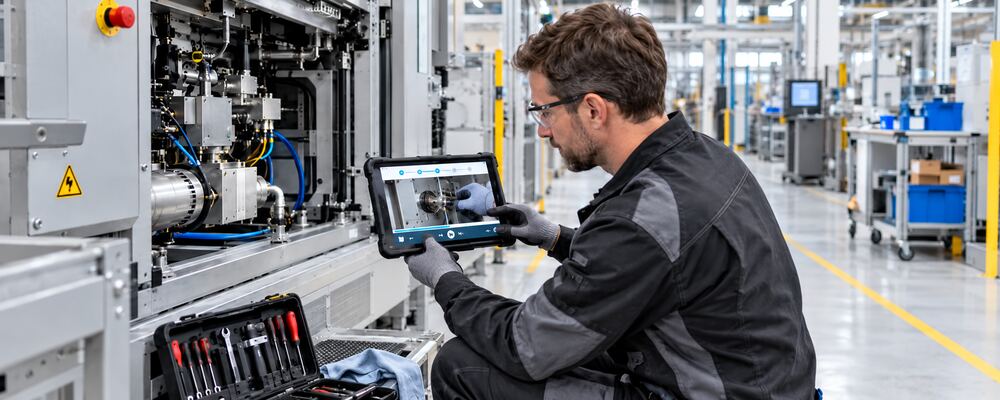
Summary: Video work instructions help production managers, quality managers and health and safety specialists communicate approved procedures clearly. Integrated into flowdit, each video appears at the relevant work step, alongside measurements, checks and documentation fields. Employees can see how to perform the task and record the result directly.
Where Most Plants Stand Today
Training room, laminated work instructions, Excel checklist: in many companies, knowledge transfer, task execution and documentation are still separate processes. Employees are shown a procedure during induction, are then required to carry it out from memory, and subsequently enter the results into a different system. Furthermore, when an experienced specialist leaves the company, practical knowledge is often lost because it was never fully recorded in the written work instructions.
This works for simple, frequently repeated tasks. However, when it comes to product changes, rare maintenance tasks or safety-critical processes, queries, search times and data entry errors arise. An industrial video visualises the intended workflow. Digital work instructions ensure that this knowledge is available at exactly the right stage of the process.
What Are Video Work Instructions?
A video work instruction is a visual, step-by-step guide for a specific work process. It demonstrates movements, sequences, tools, inspection criteria and safety measures directly at the actual workplace. Unlike a general training film, it is task-specific and structured in such a way that individual sequences can be accessed as and when needed whilst working.
The key distinction is this: an industrial video explains a process. A digital work instruction guides employees through that process. It combines text, images and video sequences with input fields, checks and process logic.
In short: The video demonstrates the procedure. The digital work instruction controls the sequence, checks and verification. Together, they transform explanatory content into an executable process.
Using videos directly within the work process?
With flowdit, work instructions are presented in a clear and easy-to-understand way – discover it now.
Benefits of Video Work Instructions in Manufacturing
Video work instructions demonstrate the approved procedure directly at the workplace. This is particularly beneficial for new employees, agency workers, those working rotating shifts and international teams:
- ✅ Simplification of complex tasks: Step-by-step instructions break down extensive processes into understandable individual steps.
- ✅ Consistent execution: Thanks to standardised videos, all staff members follow the same prescribed procedure.
- ✅ Faster induction: New staff can watch and repeat individual work steps.
- ✅ Better knowledge retention: Visual representation makes movements and procedures easier to understand and remember.
- ✅ Multilingual delivery: Subtitles make the content accessible to international teams.
- ✅ Visible safety measures: Safety-critical procedures and the correct personal protective equipment are shown directly.
- ✅ Direct access: The relevant video clip is available whilst the task is being carried out at the workplace.
- ✅ Preserving expertise: Well-rehearsed manoeuvres and processes that are difficult to describe in words are retained even when experienced specialists leave the company.
Video work instructions are particularly helpful for set-up procedures, assembly sequences, tool changes, cleaning procedures, machine checks and maintenance tasks carried out infrequently.
Which Medium Fits Which Step of the Process?
A good digital work instruction does not consist solely of videos. For each step, it uses the medium that explains the task most quickly and clearly.
| Medium | Best for | Industrial example |
|---|---|---|
| Text | Target values, limit values, warnings and decision criteria | Tightening torque, inspection tolerance or release value |
| Photo or graphic | Component positions, lifting points, defect patterns and correct conditions | Correct seating of a seal or an acceptable defect pattern |
| Video | Movement sequences, order of steps, tool handling and spatial orientation | Changeover, filter replacement or safe machine shutdown |
| Digital checklist | Confirmations, measured values, photos, signatures and deviations | OK/NOK check with mandatory photo and follow-up action |
A useful rule of thumb is: Movement belongs in the video; changing values belong in the text. A tightening moment can be updated in a text box within a few minutes. If, on the other hand, it is narrated or displayed in the video, the entire sequence must be re-produced if a change is required.
Safety requirements and protective equipment should also be presented as text directly alongside the relevant step. The video can additionally demonstrate how the requirement is implemented in practice. This division reduces the maintenance effort required later on and makes it easier to establish a structured manufacturing SOP.
Where Video Alone Falls Short
A video explains the intended procedure but does not control it automatically. It does not record any measured values, does not request any mandatory information and does not document whether a task has been completed in full. Even a video file in a media library does not reliably answer the following questions:
- Did the employee use the currently approved version?
- Was every required step carried out?
- What measurement was recorded?
- Was there a deviation or a defect?
- Which follow-up task was triggered?
- Who carried out the process and when?
flowdit closes this gap: the video sequences are integrated into a controlled workflow, linked to the necessary inputs and documented alongside the execution.
Combining Video Work Instructions with Digital Checklists
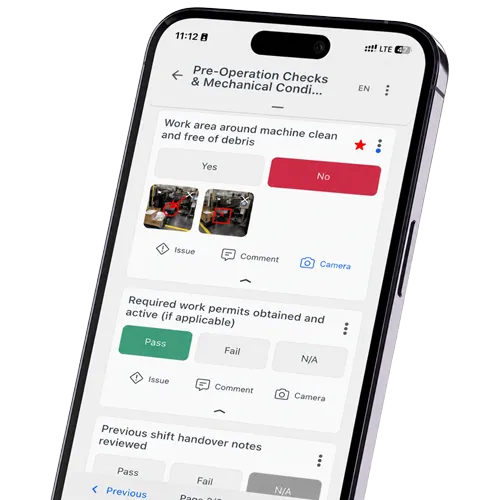
The video is not placed at the start of a checklist as a long film. Instead, each relevant clip is assigned to the appropriate inspection or work step. Directly below this are the entries that confirm the target condition shown: for example, a measured value, an OK/NOK selection, a photograph, a comment or a signature.
Conditions then control the subsequent sequence of events. If a threshold value is exceeded or a result is rated as ‘NOK’, the digital checklist may require a description of the fault, display additional questions or trigger a follow-up task. This transforms passive viewing into a guided and traceable process.
With flowdit, teams can provide instructions and media directly at individual inspection stages. Employees carry out the work instructions on a smartphone, tablet or PC, even without an internet connection if necessary. The required details are recorded whilst the task is being carried out and subsequently compiled into a report. There is no need for separate post-task documentation.
How to Turn Videos Into Digital Work Instructions Using flowdit
The workflow at the workplace is simple:
- The employee opens the assigned work instruction.
- A short video clip explains the current step in the process.
- The employee carries out the task shown.
- Measurements, photos or confirmations are recorded directly.
- If there is a deviation, a notification or follow-up task is generated.
- flowdit documents the results in the report.
Subtitles allow for additional languages without having to re-film the workflow. In areas without a stable connection, flowdit stores the entries offline and synchronises them as soon as the device is back online.
Still managing operations with paper and Excel?
Digitize inspections, audits, SOPs, and corrective actions.
Typical Use Cases for Video Work Instructions
Video work instructions are particularly helpful when movements, sequences or target states that are difficult to describe need to be communicated. Typical areas of application are:
- Production and assembly: Assembly sequences, changeovers between variants, tool handling, visual inspections and rework.
- Maintenance and servicing: inspection rounds, lubrication tasks, filter changes, lockout-tagout procedures and recommissioning.
- Quality assurance: inspection criteria, pass/fail examples, handling of measuring equipment and response plans in the event of non-conformities.
- Health and safety: Personal protective equipment, safe machine operation, lockout-tagout procedures, hazardous substances and how to respond to malfunctions.
- Induction: Standardised procedures for new employees, agency workers and cross-site teams.
- Tasks performed infrequently: Set-up procedures, fault rectification and maintenance work for which routine knowledge is lacking.
Occupational Safety: What a Video Can and Can't Do
Video work instructions can demonstrate safety-related procedures directly at the workplace, including:
- putting on personal protective equipment correctly,
- shutting down machinery safely,
- isolating hazardous energy and preventing unexpected restart (lockout/tagout),
- handling hazardous substances safely,
- following safe procedures in hazardous areas,
- carrying out safety checks before starting work.
A video can show where to isolate a machine, how to fit protective equipment or what to check before starting work. Watching it, however, does not prove that an employee can perform the task safely. For safety-critical tasks, combine the video with practical instruction and a check of understanding, for example by asking employees to demonstrate the approved procedure and explain the relevant hazards.
Whether video-based instruction fulfils a training requirement depends on the applicable local rules and the task involved. In the US, OSHA explains that training requirements vary by standard; some explicitly require practical training or interaction with a trainer. In the EU, Article 12 of Directive 89/391/EEC requires training specific to the worker’s workstation or job. Use video work instructions to support the required training and reinforce approved procedures at the point of work.
How to Structure Video Sequences for Work Instructions
- Show only one clearly defined work step per video, about 20 to 45 seconds long
- Film the approved standard process, not the personal working style of an individual expert
- Capture relevant details from the operator's point of view
- Place warnings before the hazardous action
- Keep subtitles and on-screen text legible on small displays
- Respect personal rights and company data protection requirements
- Assign responsibility for review, approval and updates
- Version the video and the related work instruction together
- Test the mobile display under real conditions on site
- Avoid spoken target values and voice-over text so that changes do not require a complete reshoot.
- Use clear, simple language and keep subtitles and on-screen text legible on small displays

Ralf Löwenbrück of epicworks, flowdit’s video production partner based in Germany, explains what operators need to see when following a video work instruction
How Do You Keep Video Work Instructions Current After a Process Change?
A clear structure keeps the work instructions up to date. If a target value changes, you edit the text in the relevant work step and approve the revised version. If the movement sequence changes, you only reshoot the corresponding video clip and replace it in flowdit. Everything else stays as it is. The video work instruction can be updated without filming the entire procedure again.
Every instruction needs a person with technical responsibility, an approval status and a defined review cycle. Changes to machines, materials, process sequences, safety measures or quality limits trigger an additional review. Complaints, near misses and recurring deviations can also make a revision necessary.
Clause 7.5 of ISO 9001 requires control of documented information. This covers availability, protection and change control, among other things. A single video on a network drive, by contrast, often has no clear version status and no link to the task actually performed. Consistent process documentation in production connects the approved instruction with its actual execution.
What Suitable Software Should Be Able to Do
Software for digital video work instructions should:
- assign videos, images and notes to individual work steps,
- support measured values, mandatory fields and conditional follow-up actions,
- manage approvals, versions and change status,
- be usable on smartphones, tablets and PCs,
- work offline when there is no network connection,
- support multilingual content,
- combine deviations and evidence in a single report, and
- separate roles and permissions so that only approved content is used.
Practical suitability does not depend on the number of media features. What matters is whether the software brings instruction, execution and documentation together in one continuous workflow.
Common Mistakes in Video Work Instructions
- ❌ A single ten-minute video replaces short process steps that users can select directly.
- ❌ An experienced employee shows his personal way of working instead of the approved standard process.
- ❌ Warnings appear only after the hazardous action has already begun.
- ❌ Target values are spoken into the video and can only be changed later with considerable effort.
- ❌ Subtitles and technical terms are not legible on the device in use.
- ❌ Videos sit in folders or chats without a clear version or owner.
- ❌ Only opening the video is documented, not whether the task was carried out correctly.
- ❌ Changes to machines, materials or the risk assessment do not trigger a content review.
Creating Video Work Instructions with Your Team or a Production Partner
Start with a task that regularly causes questions, errors or rework. Have the process owner confirm the approved procedure, then decide which steps need video and which are better explained with text or photos.
Your own team or a video production partner can record the footage. Whoever films the process needs to understand the task, capture the relevant details and follow your site’s safety and filming requirements. Test the clips on the device employees will use at the workplace.
In flowdit, assign each clip to the relevant work step and add the measurements, confirmations or evidence required for that task. Have the process owner review the complete instruction before releasing it for use.
flowdit works with epicworks, a video production company based in Germany, to combine practical filming expertise with digital work instructions. You can also use videos created by your own team or your preferred production partner.
Bring Video Instructions Into Your Workflow
FAQ | Video Work Instructions for Manufacturing
What are video work instructions?
Video work instructions show a task step by step in short clips, filmed at the real workstation. Each clip belongs to one work step and sits next to the text, target values and checks for that step. Employees see how the job is done and record the result in the same place.
How do video work instructions differ from an industrial or training video?
An industrial video explains or presents a process in general terms. Video work instructions are built for execution. They are task-specific, split into steps and opened on the shop floor while the work is being done.
Can video work instructions replace written work instructions?
Not where the law requires a written form. Under Article 8 of EU Directive 2009/104/EC, workers must receive adequate information and, where appropriate, written instructions on the use of work equipment. National rules and OSHA standards add their own requirements. In practice, video works best as part of digital work instructions: the clip shows the movement, the text holds the binding values.
Can a safety video replace safety training?
No. Article 12 of the EU Framework Directive 89/391/EEC requires training specific to the job, and OSHA has stated several times that video or computer-based training alone is usually not enough. Employees need the chance to ask a qualified person. The person in charge must also make sure the content was understood and can be applied.
How long should video work instructions be?
One step per clip, usually 20 to 45 seconds. A complete task made of several clips often runs 2 to 5 minutes. If it takes longer, add more steps rather than speeding up or cutting hand movements. PPE, torque values and warnings also belong in text at the relevant step.
How do you add videos to work instructions and checklists?
Assign each clip directly to the work or inspection step it explains. Below it come the mandatory fields, such as a measured value, OK/NOK, a photo or a signature. If a check fails, the checklist starts the defined follow-up questions or corrective actions.
Where are video work instructions most useful?
Wherever movement and sequence matter: assembly, maintenance, changeovers, quality inspections and lockout/tagout. For simple limit values or static details, text and a photo are faster.
What is the difference between a video SOP and a video work instruction?
An SOP defines the process: which tasks are needed, who does them and when. A work instruction describes one of those tasks step by step. Video belongs at the work instruction level, linked to the SOP above it.
Can employees use video work instructions on tablets and offline?
Yes, if the software supports it. Video work instructions should run on smartphones, tablets and PCs. In areas without a network, the app loads the job in advance and syncs the results once the connection is back.
How do you handle multilingual video work instructions?
Film without spoken text where you can. Subtitles and on-screen text are then translated per language, and the footage stays the same. Every site works with one approved video instead of a separate shoot for each language.
How are changes approved and tracked?
Each instruction needs an owner, an approval status and a review cycle. If a target value changes, you edit the text and approve the new version. If the movement changes, you reshoot only that clip. ISO 9001 clause 7.5 requires this kind of control over documented information, including changes.
What should video work instruction software be able to do?
It should link each clip to a single step and record measured values and evidence right there. Versioning with approval is a must for ISO 9001, and offline use matters on most shop floors. The deciding question: do instruction, execution and documentation sit in one workflow, or in separate tools?
How do video work instructions support process improvement?
The video only shows the standard. The useful data comes from documented execution, for example which step regularly takes longer than planned and which check keeps ending in NOK. Those numbers show whether the instruction needs revising or the process itself is the problem.