Skip to content
 EN
EN  DE
DE  العربية




Summary: Your final inspection has been completed and all characteristics have been ticked off. However, you are unable to verify which batch the inspection report belongs to because the batch number is missing. Such omissions often only come to light when a complaint is made or during an audit. Here, you will learn how to rectify inspection specifications before the changeover and link inspection data in such a way that it serves as valid evidence.
Key Facts
- Errors in inspection documentation typically arise at points where different media meet, such as between an inspection plan in Excel and a paper report.
- Unclear inspection criteria and out-of-date tolerances must be rectified before digitisation. Otherwise, the software will simply carry over the existing errors.
- Mandatory fields prevent empty entries, but do not prevent fabricated or incorrectly assigned measurement values.
- Only when quality data is linked can error frequencies and the impact of corrective actions be analysed.
- A pilot process using previously measured baseline values shows whether evidence becomes more complete and responses to non-conformities become faster.
- ISO 9001 permits the use of both paper and software. Documentation is audit-ready if results are traceable and protected against unnoticed changes.
What Is Digital Quality Control?
Digital quality control is the software-supported planning, execution and evaluation of quality inspections. Inspectors record measurement values and photos directly at the inspection station. The software assigns each result to the inspected item, evaluates it against predefined rules and supports the handling of non-conformities through to documented release.
Typical quality checks include incoming goods inspection, in-process inspection, operator self-inspection and final inspection. Inspectors capture data on a tablet or smartphone, and measurement values can also come directly from connected measuring instruments.
Difference between quality assurance and quality control: Quality control checks whether product quality meets the requirements. Quality assurance starts earlier, for example with inspection planning and gauge management. Both are part of quality management.
A scanned paper-based form is not yet digital inspection documentation. It only becomes usable for analysis once every characteristic and every measurement value is stored as a separate data field.
Inspection Done, Report Still Open?
With flowdit, the documentation is created during the inspection. Find out more.
Which Quality Risks Arise from Faulty Inspection Documentation?
The overview shows typical errors in inspection documentation, their impact and the matching digital control.
| Risk | Impact | Digital control |
|---|---|---|
| Outdated inspection specifications | Inspection against an invalid drawing revision | Approved inspection plan version linked to the drawing revision |
| Incorrect assignment | Result assigned to the wrong order or part | Identification via batch or serial number |
| Missing results | Inspection counts as complete despite open characteristics | Completeness check before closing |
| Transcription errors | Deviating values due to manual re-entry | Capture at the inspection station or via measuring instrument interface |
| Unclear findings | Finding without defect type, location or evidence | Defect catalogue and photo attached to the characteristic |
| Unnoticed changes | Results overwritten after the fact | Change history and access rights concept |
| Unresolved non-conformities | Delivery despite a documented non-conformity | Defined hold and release process |
A mandatory field prevents an empty entry. It does not prevent a fabricated measurement value. Digital rules must therefore match the actual inspection method. Nor does a photo replace a dimensional inspection or the assessment by a qualified person.
Which Inspection Processes Need Reviewing before Digitisation?
An unclear form does not become clearer by moving it into software. Before the changeover, check every inspection specification for the following information:
| Element | Requirement |
|---|---|
| Inspection characteristic | Clearly named and assigned to a drawing position; for variants, with validity per version |
| Inspection method | Variable, attribute or visual, with a defined procedure |
| Nominal value and tolerance | With unit, checked against the current drawing revision |
| Acceptance criterion | For visual inspections, with an approved limit sample or reference image |
| Inspection equipment | Specific measuring instrument with calibration status |
| Inspection interval and sample | Fixed frequency and sample size, for example per lot or after a tool change |
| Reaction plan | Notification, hold and scope of re-inspection in case of a non-conformity |
| Change authority | Responsibility for changing and approving the inspection specification |
Instructions such as “inspect regularly” or “carry out visual inspection” do not meet these requirements. For sampling inspection of incoming goods, sampling plans according to ISO 2859-1 (AQL) are suitable. Their results also feed into the evaluation of supplier quality. For critical characteristics, a measurement system analysis shows that the measuring instrument is capable of the tolerance.
What Information Should a Digital Inspection Record Contain?
The inspection record documents the inspected item, the inspection specification, the result and the release decision. For quality inspection in manufacturing, the following structure has proven useful:
- Inspected item: part number, variant, batch or serial number
- Production order and inspection lot form the inspection order.
- Inspection specification with inspection plan version and drawing revision
- Nominal value and tolerance as the basis for evaluation, for visual inspections an acceptance criterion
- Who inspected when and with which equipment (execution)
- Result: the measured value or finding, plus the evidence
- In the event of a non-conformity, the affected scope and the immediate action
- Release with name and change history
For variable inspections, always store the numerical value. An “OK” shows neither how close a value is to the tolerance limit nor a trend.
A single record only proves a single inspection. Continuous quality data is created when measurement value, non-conformity and corrective action are linked in the same system. A pareto analysis then shows which quality problems occur most often. On the same characteristic, you can also see whether the defect rate falls after a corrective action (CAPA). This makes continuous improvement measurable.
How Do You Implement Digital Quality Control in Manufacturing?
The process depends on the organisation. In companies with several plants, licensing, IT approval, interfaces and, where applicable, validation run in parallel. The following sequence has proven effective, even if phases overlap.
1. Select an Inspection Process with a Clear Need for Action
Suitable candidates are a frequent incoming goods inspection with a lot of re-entry or a final inspection with missing evidence. Measure beforehand: minutes per record, corrected records per month, time needed to find the evidence for a batch. Involve quality management, inspection staff and IT from the start. People who inspect every day notice early whether input fields, devices and workflows work at the workstation.
2. Link Inspected Items and Data Clearly
Define which data comes from ERP, MES or CAQ and which system is the master. Part numbers and units must match across all systems.
A QR code or barcode makes it easier to select the inspected item. It only prevents mix-ups if its assignment is correct and can be checked at the workstation.
For every inspection, it must remain traceable which specifications applied when it started. Define in your change control how inspections in progress are handled when the template changes.
3. Safeguard Inputs and Exceptions
Set up numeric fields with units and tolerance limits. Distinguish between plausibility and conformity: a measurement value can be technically plausible and still lie outside the specification.
A genuine value outside the tolerance must remain recordable. The software should evaluate it and trigger the follow-up process instead of blocking the entry. Statuses such as “cannot be inspected” or “aborted” need their own values. A missing result must never count as passed.
4. Link Non-Conformities to Binding Decisions
Define who evaluates a finding and who decides on rework, scrap or a concession. A notification alone does not stop a single part. The hold must take effect organisationally or in the responsible system.
Separate the correction on the part from the corrective action against the cause. With recurring defects, reworking individual parts is not enough. The effectiveness of the corrective action must be verified.
5. Test the Workflow under Real Conditions
Test with real products, on all shifts and on every production line involved. Also run through failure cases: an incorrect measurement value, a blocked measuring instrument, an aborted inspection.
For offline use, further questions matter: Which templates are stored on the device? Is data retained after a restart? How are duplicate transfers or conflicting changes handled?
Online, a non-conformity is visible centrally in real time. Recorded offline, it only becomes visible once it has been transferred. Critical findings therefore need a local reporting and hold route that also works without a network connection.
6. Evaluate Results and Roll Out in a Controlled Way
Compare the pilot results with the baseline values, for similar inspection types and scopes. Once the digital process is approved, double entry on paper ends. A documented fallback process remains in place for system outages.
Only roll out once non-conformity handling and release also run reliably. Every further area needs a person responsible, training and a technical acceptance.
How Do You Choose Quality Inspection Software?
Test any quality inspection software with your own inspection workflow. A standard demo does not show your variants and special cases.
| Requirement | What the test should show |
|---|---|
| Inspection planning and versioning | Past inspections keep their original specification status. |
| Measurement values and tolerances | Limit values and units are evaluated correctly. |
| Traceability | Results can be found by order, batch or serial number. |
| Equipment reference | Blocked or overdue measuring instruments are detected before measuring. |
| Non-conformity management | Finding, responsibility, decision and re-inspection are linked. |
| Rights and history | Corrections remain visible; releases are reserved for authorised persons. |
| Use at the inspection station | Frequent inspections require few inputs. |
| Offline operation | Synchronisation and conflicts are handled properly. |
| Interfaces | Data exchange with ERP or MES and complete export work. |
For mobile visual inspections and guided checklists, digital tools such as checklist software are often sufficient. For extensive inspection planning, SPC or many connected measuring instruments, CAQ software is an option. An existing ERP or MES system may already cover parts of this. With cloud-based software, the provider usually handles server operation and updates; clarify data location and access rights in advance. Calculate the total costs over several years. Besides licences, interface maintenance and internal training time are the main factors.
Still using paper or Excel for quality checks?
Standardize inspections, track actions, keep records.
What Makes Digital Inspection Records Audit-Ready?
In an audit, the inspection specification, result and release decision must be traceable. Quality records must be retrievable and protected against unnoticed changes.
The ISO guidance on documented information for ISO 9001:2015 accepts paper and electronic media alike. If inspection records are kept in a digital quality management system, document control and access rights must be defined there. A PDF export or a signature on a tablet is not sufficient on its own. Also define retention periods and data backup.
Industry-specific quality standards also apply. In the automotive industry, these include IATF 16949 and customer-specific requirements; VDA Volume 1 provides guidance on archiving. For regulatory compliance in pharmaceutical production, EU GMP Annex 11 and 21 CFR Part 11 apply, including the obligation to validate the system.
Which KPIs Show the Impact of Digital Quality Control?
In addition to time savings, measure the reliability of the records and the response to non-conformities.
| KPI | Definition |
|---|---|
| Documentation time | Minutes for capture and report per inspection |
| First-time completeness | Share of records accepted without queries |
| Assignment errors | Incorrectly assigned results relative to checked records |
| Response time | Time from finding to immediate action |
| Overdue actions | Share of open actions past their due date |
| Evidence search time | Time to provide the complete record for an inspected item |
Value the time saved at your internal hourly rates and compare it with the implementation and operating costs. If the number of recorded non-conformities rises after the changeover, this does not have to mean things have got worse. Defects may simply be recorded more consistently. Always assess such figures together with inspection scope, product mix and defect type.
Where Can AI and Automated Measurement Data Capture Support Inspections?
Automating measurement data capture avoids manual transcription. This requires the inspected item, characteristic, unit and measuring instrument to be assigned correctly. A faulty interface just transfers wrong data faster.
In AI-based quality control, systems evaluate images or detect anomalies in inspection data, provided the data basis is suitable. Their benefit depends on proven performance under actual production conditions.
Test in particular for missed defects and incorrect reject decisions. Changes in lighting, material or product variants may require a new assessment. Who decides on releases must remain clearly defined in the process.
Anyone who wants to automate quality inspection needs clean master data, clear inspection specifications and reliable records.
Implementing Digital Quality Control with flowdit
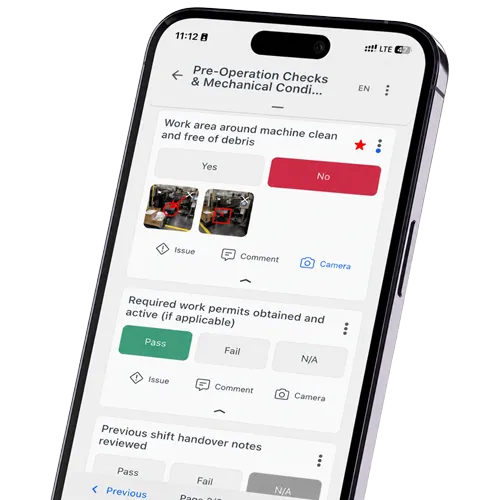
Start where queries or rework occur today. With flowdit, your team records measurement values, photos and findings in digital checklists directly at the inspection station. This produces digital inspection records; actions with owners and deadlines can be created for any non-conformities found. This connects the inspection with the documentation and the further processing of its results.
How Can Your Quality Inspection Become Digitally Traceable?
Choose a quality inspection from your daily work. Together we will map it in flowdit, from the first measurement value to the inspection report. We will show you how to record non-conformities and track actions.
Book a demo ›20 minutes · Bring your current inspection checklist.
FAQ | Digital Quality Control
Is Excel sufficient for inspection documentation?
For simple, controlled processes, Excel can be enough. With several users, frequent variant changes and multi-level releases, version control, access rights and traceability must be additionally secured.
What changes for inspection records when a paper-based QMS becomes a digital QMS?
In a paper-based QMS, the inspection form is a controlled document, and every completed sheet is a record that has to be filed and retrieved. A digital QMS keeps the template under document control, with version and approval. Results are stored as data fields and linked to the order, batch and any non-conformity. Corrections appear in the change history with name and time. Retention periods and access rights still have to be defined, as with paper.
What is the difference between an inspection plan and an inspection record?
The inspection plan defines in advance what is inspected, with what and how often. The inspection record documents the actual inspection.
How long does the switch to digital inspection records take?
That depends mainly on the quality of the templates and the interfaces. A clearly defined process without integration can be introduced faster than a cross-site inspection data system. Explicitly plan time for cleaning up specifications, testing and training.
Does digital quality control work without internet access?
Yes, with offline-capable software such as flowdit. Inspection specifications and results are stored locally on the device and synchronised at the next connection.
Do digital inspection records completely prevent quality defects?
No. They reduce documentation gaps, assignment errors and certain input errors. Inspection quality continues to depend on method, inspection equipment and the qualification of the inspectors.