Skip to content
 EN
EN  DE
DE  العربية



Digital Work Instructions: What They Are, What’s in Them, and How They Beat Paper
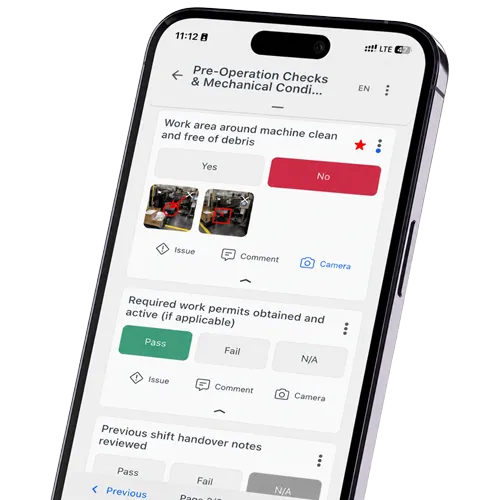
Digital work instructions put each task step on a screen: text, a photo, a short video, a box to confirm it’s done. Paper can’t update itself; these can. Teams often use ‘work instruction’ and ‘SOP’ interchangeably, but one is the single step and the other is the policy sitting above it.
Why do digital work instructions matter?
Digital work instructions matter because the cost of a wrong or outdated instruction lands directly on quality, safety and output. When every operator sees the current version on screen, with the right photo and a check on each step, errors and rework drop and new starters get up to speed faster. That makes them a foundation of standardized work and a core building block of the connected worker and the paperless factory.
How is a digital work instruction different from an SOP?
Level, not format. An SOP sets the policy: what has to happen and who signs off. A work instruction is the how: the exact moves an operator makes at one step. Put it on a tablet with a photo and a tick box and it’s digital. That’s the whole difference. ‘Visual’ or ‘interactive’ instructions are the same thing leaning harder on pictures.
What goes into a good digital work instruction?
A wall of text on a screen is still a wall of text. The ones that actually cut errors carry:
- Steps in order, one action each, in the sequence the operator actually works.
- A picture on every step: a photo, a marked-up image, or a few seconds of video.
- The check that proves the step is right, a measurement or a plain pass/fail.
- Tools and parts listed up front, so nobody walks off mid-task to hunt for something.
- Safety called out where the risk happens, not buried in a preface nobody reads.
- A version stamp and a sign-off: which revision, who did it, when.
What are the benefits of going paperless?
Publish once and every station shows the current version that second. No more chasing outdated printouts. Media-heavy steps shorten training and cut mistakes, and the tick-boxes leave a trail a binder never could. Run them through work instruction software and fold them into shopfloor management; pair a fiddly step with a one point lesson when a full instruction is overkill.
Paper vs digital, where it bites
The gap that makes the switch worth the trouble.
| Where it bites | Paper | Digital |
|---|---|---|
| Updating | Reprint, redistribute, hope | Publish once, live everywhere |
| Media | Flat text and photos | Video, zoom, annotation |
| Right version | You hope it's the latest | Enforced, every time |
| Catching errors | Nothing stops a skipped step | Checks and interlocks in-line |
| Proof it was done | A signature on a sheet | Time-stamped, per step |
| Training | Read it, shadow someone | Guided, at the worker's pace |
Free Work Instruction Step Sheet
It gives every step a photo slot, a check and a sign-off so a new instruction stays consistent. Download the checklist (PDF). You can also complete the checklist digitally in flowdit on your phone, tablet or PC.
Related Terms
- MES – can push the right instruction for each operation.
- Manufacturing Operations Management (MOM) – the layer instructions live in.
- Operator Rounds – routine tasks these often guide.
- Visual Inspection – a step type instructions lean on.
- Assembly Work Instruction
- Worker Assistance System
Further Reading
- Work Instruction Software
- Writing Clear Work Instructions – the underlying document type
- Work Instruction Templates – ready-made formats to digitize
- Video Work Instructions for Manufacturing