Skip to content
 EN
EN  DE
DE  العربية




Introduction
Transparency and efficiency decide how a commissioning phase goes, whether you are on a construction project, a machine build, or an equipment installation. For a long time, commissioning ran on manual coordination: contractors, engineers, and stakeholders working through disconnected tools and scattered communication. That approach led to delays, duplicated work, and no clear accountability. As projects grew in size and complexity, teams needed digital tools that scale. Commissioning software answers that need. It gives you a central platform to plan, track, and verify that every system and component is designed, installed, tested, and maintained to your project requirements. More and more teams now turn to cloud-based commissioning for digital workflows and real-time collaboration.
At its core, commissioning software standardizes the process and keeps everything you need in one place. It replaces manual methods like spreadsheets, emails, and paper documentation with a digital, collaborative system that offers real-time visibility, data integrity, and traceable workflows. These platforms help commissioning teams manage equipment checklists, track test results, handle documentation, and hold compliance across disciplines.
Transform Your Commissioning Process
Our Commissioning Software handles testing, tracking, and collaboration in one place, keeping your projects compliant and on schedule.
What Is Commissioning Software Used For?
Teams use commissioning software to save hours that manual methods waste, and with them, money. Several industries rely on mobile commissioning to run the core jobs below.
- Project coordination. One shared view keeps teams aligned on deadlines and deliverables, so fewer things fall between the cracks.
- Performance monitoring. Track equipment function, testing outcomes, and system readiness through the whole phase. Teams verify that systems work as designed before handover, which heads off costly problems later.
- Workflow automation. Auto-generated checklists, task notifications, and status updates standardize repetitive work and cut manual errors. The team spends its time on execution, not admin.
- Document management. No more juggling paper forms. Test results, inspection reports, sign-offs, and punch lists live in one secure place, version-controlled and searchable.
- Compliance. Audit trails and digital sign-offs prove compliance and avoid penalties tied to incomplete documentation.
Connect these functions and a team delivers better projects, faster, with fewer surprises.
Core Functionality of Leading Commissioning Software
For teams running complex projects, the right platform is what keeps you on track. Strong commissioning software combines depth of features with cloud access, and it carries CX professionals across the whole process, from prefunctional checklists to final handover. Here is what the leading platforms, flowdit, CxPlanner, and BlueRithm among them, actually do.
Digital Documentation Management
Cloud-based software drops the spreadsheets for forms, engineering data, and check sheets. The whole team gets centralized, version-controlled documents in real time, which makes large volumes of data manageable across many commissioning activities.
Automated Workflow Tracking
Workflows across many systems get messy fast. The right software automates task assignments, status updates, and approvals, so CX teams and commissioning engineers track progress without rework. It handles everything from LEED documentation to performance testing.
Punch Lists and Issue Tracking
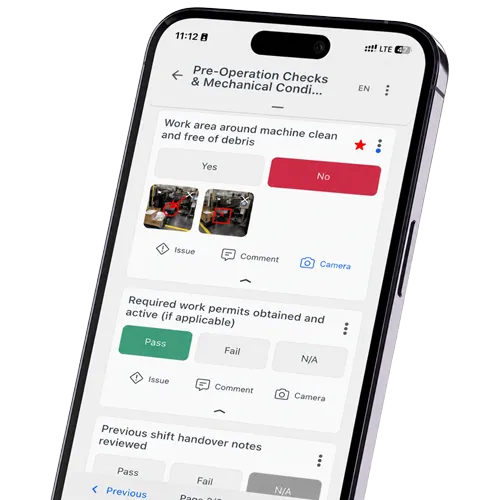
Punch list handling matters most during final commissioning and handover. Teams log issues on the punch list in the field, assign responsibility, and track resolution, all from a phone or tablet. That turns a construction punch list into something you can actually manage.
Testing and Verification Tools
Completions software usually includes tools for tests and inspections, so HVAC, energy systems, and equipment meet project requirements. These features carry performance testing and hold quality standards through the phases that matter most.
Mobile Accessibility for Field Operations
Field teams run inspections, complete check sheets, and upload photos from anywhere. With mobile access, they update project data in real time, on-site or in the office. Offline commissioning software keeps that working even with no signal.
Real-Time Collaboration and Communication
The better platforms keep construction teams, commissioning engineers, and stakeholders in direct contact. Cloud tools let people comment, share updates, and stay aligned across the project lifecycle, which heads off delays and rework.
Reporting and Analytics
Automated reports and exportable progress summaries make it easy to monitor status across every activity. Whether you track BIM-integrated data or manage files for a data center build, the right software turns raw records into insight fast.
On a large facility or an HVAC retrofit, commissioning software catches problems early, cuts setup time, and makes the whole project easier to run from kickoff to closeout. Below is a side-by-side look at how flowdit compares to the established tools.



Why Teams Trust flowdit to Simplify Commissioning Projects
- Built for Commissioning Teams - Plan, verify, and track equipment readiness with digital checklists, punch lists, and test protocols.
- Real-Time Field Collaboration - Update inspections and sign-offs on-site, online or offline. Everyone stays aligned—even across large teams.
- Punch List & Issue Tracking - Capture, assign, and resolve issues with full transparency and audit trail.
- Compliance Made Simple - Track verifications, approvals, and digital sign-offs to meet documentation standards like ISO, LEED, and FDA.
- Direct Integration - Connect flowdit with your existing systems and export reports instantly for your stakeholders.



Commissioning Software Trusted by Teams Managing Complex Assets
The right choice depends on your industry, the type of projects you run, and your operational requirements. Below is a comparison of established commissioning and construction-focused tools used across asset-intensive environments.
| Software | Industry Focus | Key Features | Best For |
|---|---|---|---|
| flowdit Commissioning Software | Construction, Machinery, and Infrastructure | Real-time testing tools Punch list tracking Collaborative workflows | Teams needing flexibility across building and equipment work |
| CxPlanner | Construction and Infrastructure | Cloud-based workflows Customizable templates Detailed inspection reports | Large-scale projects with regulatory and documentation needs |
| BlueRithm | Equipment Systems and Integrations | Strong integration with CMMS/BIM Automated reporting Scalable configuration | High-complexity commissioning with equipment interdependencies |
| Machine Verify | Industrial Equipment and Manufacturing Parts | Machine-level performance tracking Safety and compliance protocols | Asset-intensive operations requiring deep machine-level visibility |
| Facility Grid | Building Commissioning and Quality Control | Functional performance testing Issue tracking Owner and stakeholder dashboards | Owners and Cx agents on large building portfolios |
| o3 Solutions | Capital Construction and Industrial Startup | Systems completions Planning and forecasting Handover tracking | Large capital projects with formal completions processes |
Industry-Specific Commissioning Solutions
Commissioning software helps across many sectors. These three are the most common.
A. Construction
Construction is where this software earns its keep. It verifies that components and building systems work as intended. As punch lists, forms, and checklists move between trades, a solid platform keeps everything against quality standards and functional specs. This is where construction commissioning software pays off most, because the documentation load is heaviest.
B. Machine Industry
In manufacturing, commissioning software is one system for automation and startup. A structured commissioning plan gets every machine running as intended from day one, which means better reliability and fewer costly stoppages. Standardized testing, checklists, and real-time tracking make it easy to watch equipment performance and catch issues early.
C. Energy
Energy projects run complex assets: turbines, switchgear, transformers, control panels. Multi-equipment commissioning coordinates work across many assets, tracks progress in real time, and documents every test and verification step. With remote monitoring, energy teams oversee systems from anywhere, which strengthens quality management and supports safe, on-schedule completion across utility-scale and renewable builds.
How Do I Choose the Best Commissioning Software?
You have the shortlist. Now book time with a few vendors and ask the questions that show whether a tool fits how your team actually works. These are a good place to start.
- Is there a trial or pilot where you can test the platform on a real project before you commit?
- Do they support you through onboarding, or are you on your own?
- How reachable is their support when a job is live?
- After the pilot, do they follow up, and keep supporting you once you sign?
- What does the implementation timeline look like in weeks, not promises?
That is a solid baseline for any sector. If you are unsure a platform fits your setup, bring industry-specific questions to the evaluation and make them prove it.
Transforming Operations Through Digital Commissioning
Going digital is not only new software. It changes how the team works. Communication gets
simpler, repetitive tasks run themselves, and everyone sees the same project data in real time.
Errors drop and projects stay on schedule.
A good rollout makes the difference. Start by mapping your current process, find the points where things break, and pick a solution that fits your workflow and scales as you grow. At flowdit, we build for real users on real sites, whether you commission a single facility or run several projects at once.
Digital commissioning from punch list to handover.
Track open points, document progress, and hand over faster.
Copyright: Nognapas on Adobe Stock